> For the complete documentation index, see [llms.txt](https://docs.besmart.software/llms.txt). Markdown versions of documentation pages are available by appending `.md` to page URLs; this page is available as [Markdown](https://docs.besmart.software/3d-modeling-and-design/precast-concrete/feature-descriptions/column-reinforcement/configuration-settings/stirrups.md).
# Stirrups
After number and position of *Main rebar* have been defined, it's time to set up stirrups.
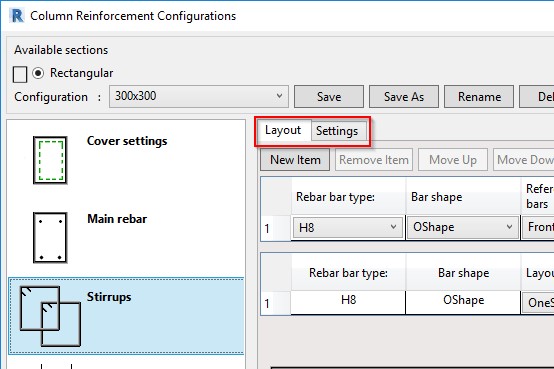
In the *Stirrups rebar* window there are 2 tabs:
* **Layout –** define reinforcement settings here
* **Settings** – select common settings, like view in Solid, Partition, etc.
In the **Layout** tab, use the New Item button to insert as many rows as needed. Use the adjacent buttons to move a row up or down or remove it.

Settings for stirrups are configured in the table. Note that there is only one table; it is simply divided into an upper and lower part to avoid being excessively wide (the rows of the "upper" table continue as the rows of the "lower" table).

The upper table has settings for rebar type and shape while the lower table is for configuring stirrup layout along the column. Let's go through the available settings:
* **Rebar bar type** – Select Structural Rebar type.
* **Bar shape** – Select from available stirrup shapes described in the image shown at the bottom of the window.
* **Reference bars** – Pick Row position of Main rebar. You are able to tie selected bars of that row.
* **First/Second bar** – Here you have numbers of *Main rebar* at selected *Row position*, counting from left to right. Select bar numbers to be tied to selected stirrup shape.
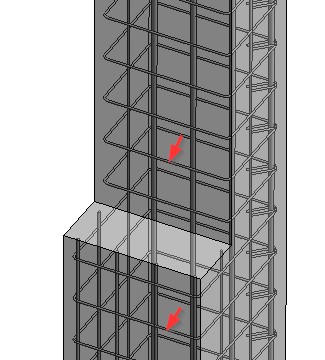
For example, if you select Back1 and define that an O-shaped stirrup should go around 1 and 2 bar, then the stirrup will tie them and go up to the Front direction to the nearest face of the column.
**Rebar start/end hook type** – hook types for stirrup ends.
**Layout Type**– Select layout rule for selected stirrup:
**One Step –** one set of rebar within defined distance of column
**L1** – defines start offset of stirrup layout. Value is relative to column length. Will work if value is greater than *Start offset.*
**L2** – defines length of stirrup layout. Relative value is used, 1 = full length of the column.
**L3** – defines end offset of stirrup layout. Value is relative to column length. Will work if value is greater than *End offset.*
**Step L1** – not active, has no influence
**Step L2** – step of stirrup layout
**Step L3** – not active, has no influence
**Offset at start** – offset from start of column
**Offset at end** – offset from end of column
**Three Steps –** from 1 to 3 sets of rebar, may have different steps in each set
**L1** – distance for stirrup layout at the start of the column. Value is relative to column length.
**L2** – distance for stirrup layout at the middle part of the column. Value is relative to column length.
**L3** – distance for stirrup layout at the end of the column. Value is relative to column length.
**Step L1** – step of stirrups in L1
**Step L2** – step of stirrups in L2
**Step L3** – step of stirrups in L3
**Offset at start** – offset from start of column
**Offset at end** – offset from end of column
**One Bar –** one set of rebar with defined number of bars
**L1** – value may be 0 or 1. If 1, then layout will begin from start of column and value of L3 will change to 0.
**L2** – number of bars
**L3** – value may be 0 or 1. If 1, then layout will begin from end of column and value of L1 will change to 0.
**Step L1** – not active, has no influence
**Step L2** – defines step of stirrups
**Step L3** – not active, has no influence
**Offset at start** – offset from start of column
**Offset at end** – offset from end of column

---
# Agent Instructions
This documentation is published with GitBook. GitBook is the documentation platform designed so that both humans and AI agents can read, navigate, and reason over technical content effectively. Learn more at gitbook.com.
## Querying This Documentation
If you need additional information that is not directly available in this page, you can query the documentation by asking a question.
Perform an HTTP GET request on the following URL with the `ask` and `goal` query parameters:
```
GET https://docs.besmart.software/3d-modeling-and-design/precast-concrete/feature-descriptions/column-reinforcement/configuration-settings/stirrups.md?ask=&goal=
```
`ask` is the immediate question: it should be specific, self-contained, and written in natural language.
`goal` is what the user is ultimately trying to achieve, the reason they need the answer. Sharing it helps GitBook give you a better, more relevant answer. A goal is most helpful when it describes the outcome the user wants rather than restating the question. For example, with `ask=how do I create an API token`, a goal like `automate deployments from our CI pipeline` lets GitBook tailor the answer to that use case.
The response will contain a direct answer to the question and relevant excerpts and sources from the documentation.
Use this mechanism when the answer is not explicitly present in the current page, you need clarification or additional context, or you want to retrieve related documentation sections.