# What is the difference between C+U, C+C\_CH and C+C families?

## Introduction

Default family loading is the first step in the Metal Framing workflow (**Settings** > **Load Families** > **Main Families**):

<figure><img src="https://239424168-files.gitbook.io/~/files/v0/b/gitbook-x-prod.appspot.com/o/spaces%2FqtUsszuAWXIZhQhrvjnb%2Fuploads%2F84SsbJ1zyFkerHiMNKyx%2FLoad%20Families_Walls.gif?alt=media&#x26;token=f1f7ec63-687b-4f05-bac4-ba611c00f6ed" alt=""><figcaption></figcaption></figure>

{% hint style="info" %}
[Learn more](https://docs.besmart.software/3d-modeling-and-design/metal-framing/getting-started) about the workflow to get started.
{% endhint %}

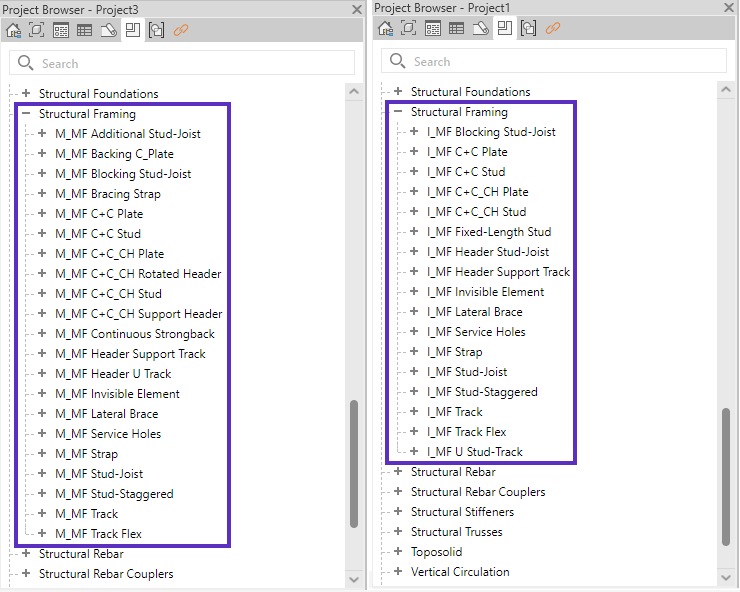
After loading Main Families, you will find a variety of studs and plates in the **Project Browser** > **Families** > **Structural Framing**:

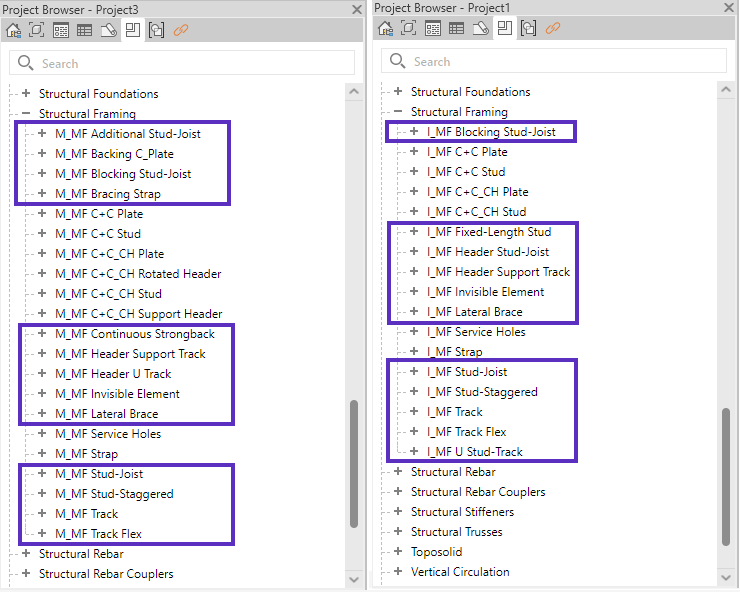
<figure><img src="https://239424168-files.gitbook.io/~/files/v0/b/gitbook-x-prod.appspot.com/o/spaces%2FqtUsszuAWXIZhQhrvjnb%2Fuploads%2F16h2m9VnwEH1ykzQdbHy%2Fimage.png?alt=media&#x26;token=19c15f54-a02e-45a2-9c2e-a4964ba27624" alt=""><figcaption><p>Metric (left) and Imperial (right) main families</p></figcaption></figure>

Each family belongs to a different framing system (C+U, C+C\_CH and C+C). Read below to learn more about each framing system.

{% hint style="danger" %}
**Note**: do not mix families from different framing systems. For example, do not use **M\_MF C+C\_CH Stud** with **M\_MF Track** or **I\_MF C+C Stud** with **I\_MF C+C\_CH Plate**. [Learn more](https://youtu.be/jyutWz2FmK4?t=194)
{% endhint %}

<table data-view="cards"><thead><tr><th></th><th data-hidden data-card-target data-type="content-ref"></th></tr></thead><tbody><tr><td>Can I use my own framing families?</td><td><a href="can-i-use-my-own-framing-families">can-i-use-my-own-framing-families</a></td></tr><tr><td>How to create new framing family types?</td><td><a href="how-to-manually-create-new-profile-sizes">how-to-manually-create-new-profile-sizes</a></td></tr></tbody></table>

## C+U

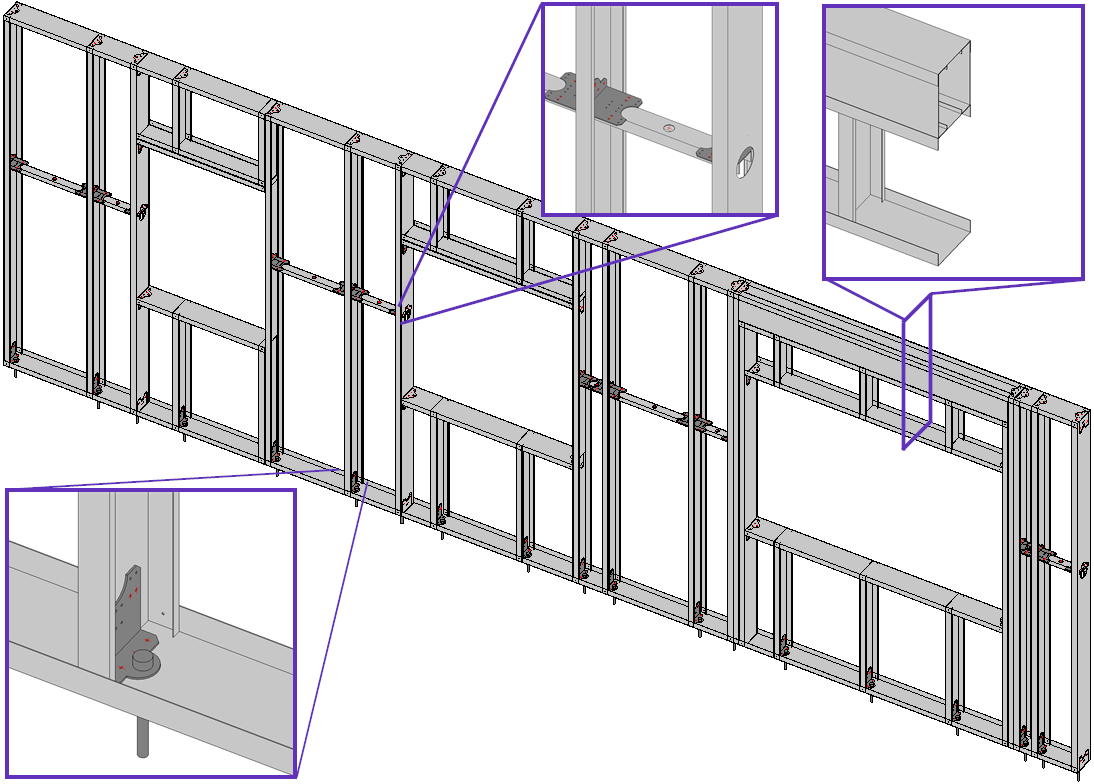
C+U families are designed for:

* Internal, non-prefab stud partitions
* **Knudson**, **Metroll** and **Scottsdale** prefab frames

<figure><img src="https://239424168-files.gitbook.io/~/files/v0/b/gitbook-x-prod.appspot.com/o/spaces%2FqtUsszuAWXIZhQhrvjnb%2Fuploads%2FLFVKRyaZ0J3xn8DOdZfJ%2Fimage.png?alt=media&#x26;token=ef154e21-57f9-4a8b-ad07-db45082b8fc5" alt=""><figcaption><p>Metric (left) and Imperial (right) C+U families</p></figcaption></figure>

{% hint style="warning" %}
Use the following families for the following purposes:

**MF Stud-Joist** - vertical elements (Studs, King Studs, Cripples, etc.)

**MF Track** - horizontal Top/Bottom Plates and Sills

**MF Blocking Stud-Joist** - horizontal Blocking/Nogging

**MF Lateral brace** - horizontal Blocking/Nogging with holes

**Header Support Track** or **MF Track** - horizontal Header
{% endhint %}

{% hint style="danger" %}
**Note**: do not use C+C\_CH or C+C families with the C+U families

For example, do not use **MF C+C Stud** with **MF Track**, etc.
{% endhint %}

These families typically include C-shaped studs (vertical profiles) and U-shaped tracks (horizontal profiles):

<figure><img src="https://239424168-files.gitbook.io/~/files/v0/b/gitbook-x-prod.appspot.com/o/spaces%2FqtUsszuAWXIZhQhrvjnb%2Fuploads%2FxQlRBettn5ncF4vFNhvE%2Fimage.png?alt=media&#x26;token=43990350-05e1-4f5f-93c7-c5c9403b3d60" alt=""><figcaption></figcaption></figure>

## C+C\_CH

C+C\_CH families are designed for **Arkitech**, **Howick**, **Pinnacle** and **Royal** prefab frames:

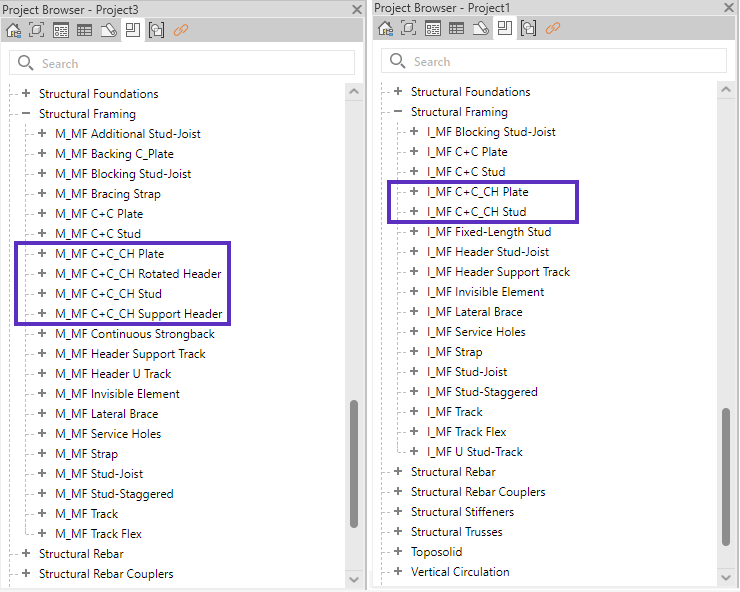
<figure><img src="https://239424168-files.gitbook.io/~/files/v0/b/gitbook-x-prod.appspot.com/o/spaces%2FqtUsszuAWXIZhQhrvjnb%2Fuploads%2FPZSVsk4aqp4Pt0tEmV4i%2Fimage.png?alt=media&#x26;token=3e22a4ec-108b-4a3a-870c-b922c22f4f95" alt=""><figcaption><p>Metric (left) and Imperial (right) C+C_CH families</p></figcaption></figure>

{% hint style="info" %}
[Learn more](https://docs.besmart.software/3d-modeling-and-design/metal-framing/getting-started/framing-arkitech-howick-or-pinnacle) about the **Arkitech/Howick/Pinnacle** framing workflow.
{% endhint %}

{% hint style="warning" %}
&#x20;Use the following families for the following purposes:

**C+C\_CH Stud** - vertical elements (Studs, King Studs, Trimmers, Cripples, etc.)

**C+C\_CH Plate** - horizontal elements (Top/Bottom Plates, Headers, Sills, Blocking/Nogging)
{% endhint %}

{% hint style="danger" %}
**Note**: do not use C+U or C+C families with the C+C\_CH families

For example, do not use **MF C+C Stud** with **MF** **C+C\_CH Plate**
{% endhint %}

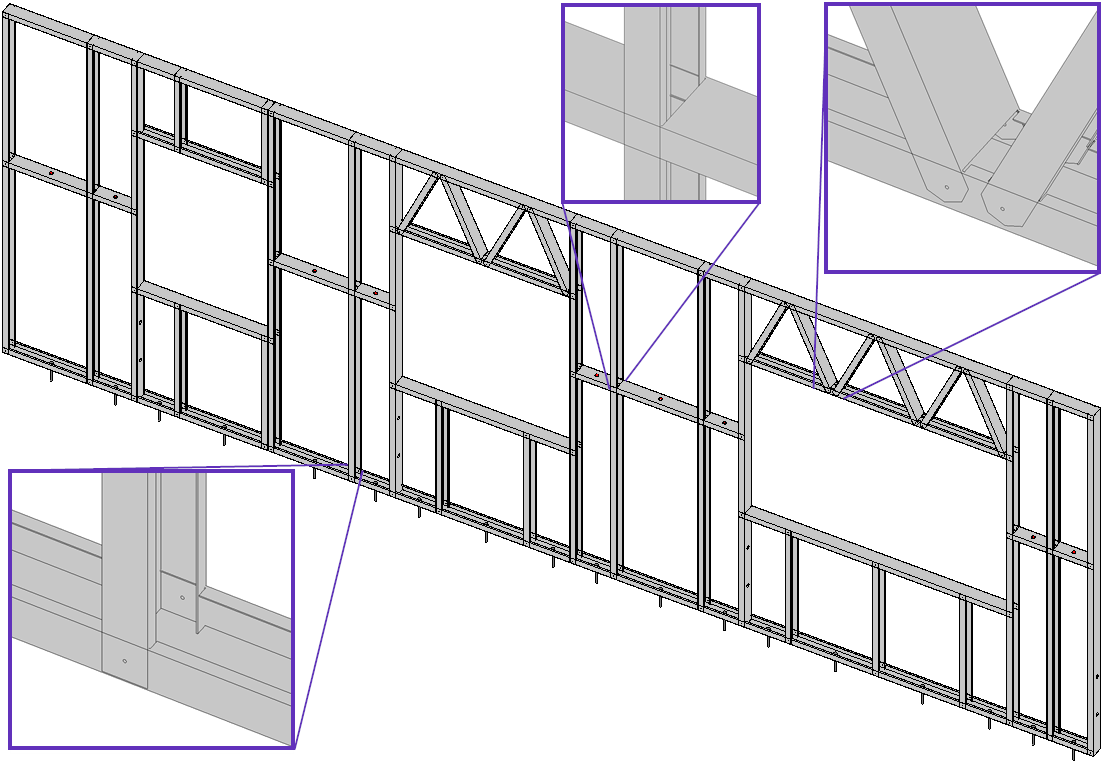
When vertical studs connect with horizontal plates, studs receive Dimple and Swage while plates receive a Dimple, Lip Cut and Notch. Diagonal elements also receive a chamfered edge (End Truss).

{% hint style="info" %}
[Learn more](https://docs.besmart.software/3d-modeling-and-design/metal-framing/faq/notches-lip-cuts-and-swages/how-to-switch-stud-and-plate-connections-cuts) about how to switch the order to punches in Stud and Plate connections.
{% endhint %}

<figure><img src="https://239424168-files.gitbook.io/~/files/v0/b/gitbook-x-prod.appspot.com/o/spaces%2FqtUsszuAWXIZhQhrvjnb%2Fuploads%2FRncxuIGMOsvgYJRLa5fl%2Fimage.png?alt=media&#x26;token=3899c293-f631-4843-ba6e-de01fbc825a8" alt=""><figcaption></figcaption></figure>

{% hint style="info" %}
Swages are not visible in the default Metal Framing families. However, the commands are visible in the exported files for CNC fabrication. [Learn more](https://docs.besmart.software/3d-modeling-and-design/metal-framing/faq/notches-lip-cuts-and-swages/why-are-swages-not-visible-in-revit-model)
{% endhint %}

<table data-view="cards"><thead><tr><th></th><th data-hidden data-card-target data-type="content-ref"></th></tr></thead><tbody><tr><td>How to switch Stud and Track connections/cuts?</td><td><a href="../notches-lip-cuts-and-swages/how-to-switch-stud-and-plate-connections-cuts">how-to-switch-stud-and-plate-connections-cuts</a></td></tr></tbody></table>

## C+C

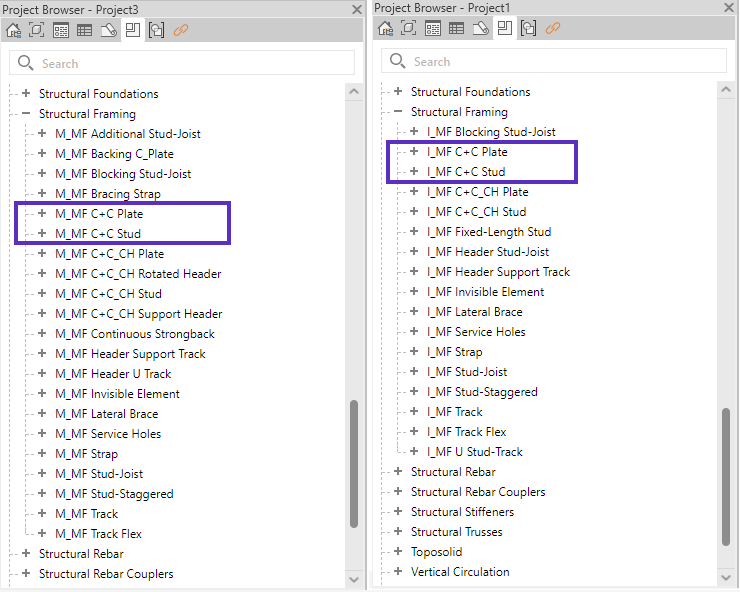
C+C families are designed for **Metroll** C+C prefab frames.

<figure><img src="https://239424168-files.gitbook.io/~/files/v0/b/gitbook-x-prod.appspot.com/o/spaces%2FqtUsszuAWXIZhQhrvjnb%2Fuploads%2FaNgnYAG6Yx5jTrePOQNL%2Fimage.png?alt=media&#x26;token=0e72f56b-f024-428f-b4c2-536b52136775" alt=""><figcaption><p>Metric (left) and Imperial (right) C+C families</p></figcaption></figure>

{% hint style="warning" %}
Use the following families for the following purposes:

**C+C Stud** - vertical elements (Studs, King Studs, Trimmers, Cripples, etc.)

**C+C Plate** - horizontal elements (Top/Bottom Plates, Headers, Sills, Blocking/Nogging)
{% endhint %}

{% hint style="danger" %}
**Note**: Do not use C+C families for the **Arkitech/Howick/Pinnacle** frames.
{% endhint %}

{% hint style="danger" %}
Do not use C+U or C+C\_CH families with C+C frames.&#x20;

For example, do not use **MF Stud-Joist** with **MF C+C Plate**, etc.
{% endhint %}

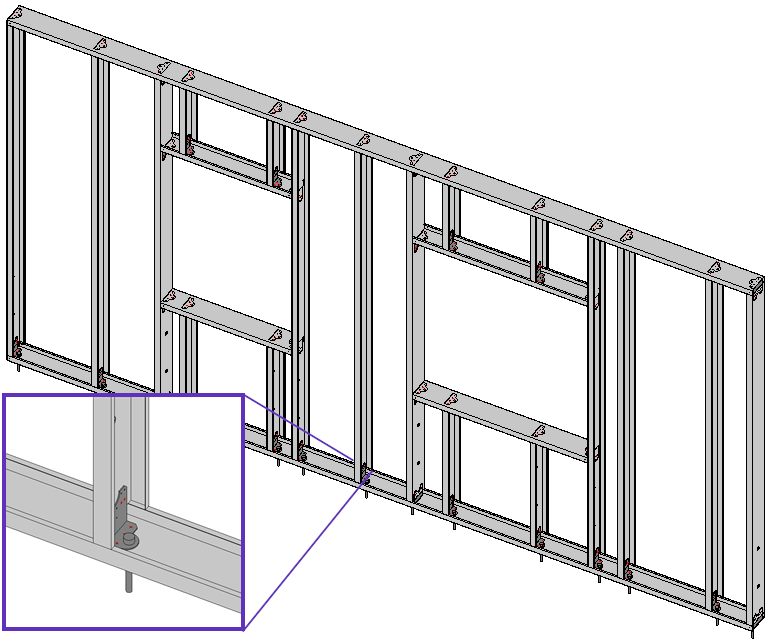
Studs and plates do not intersect, and instead, studs sit on top of the plate lips while being connecting with clips to the web of the plates:

<figure><img src="https://239424168-files.gitbook.io/~/files/v0/b/gitbook-x-prod.appspot.com/o/spaces%2FqtUsszuAWXIZhQhrvjnb%2Fuploads%2FKt0zefGLw3osDtH5TQxs%2Fimage.png?alt=media&#x26;token=0d0fc3c0-8115-4578-8d40-f8e806ce087d" alt=""><figcaption></figcaption></figure>

## Service Holes and Straps

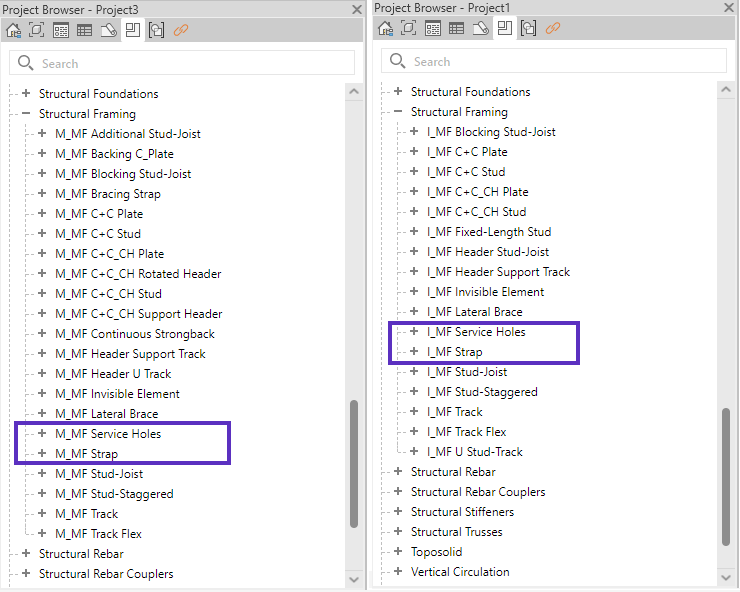
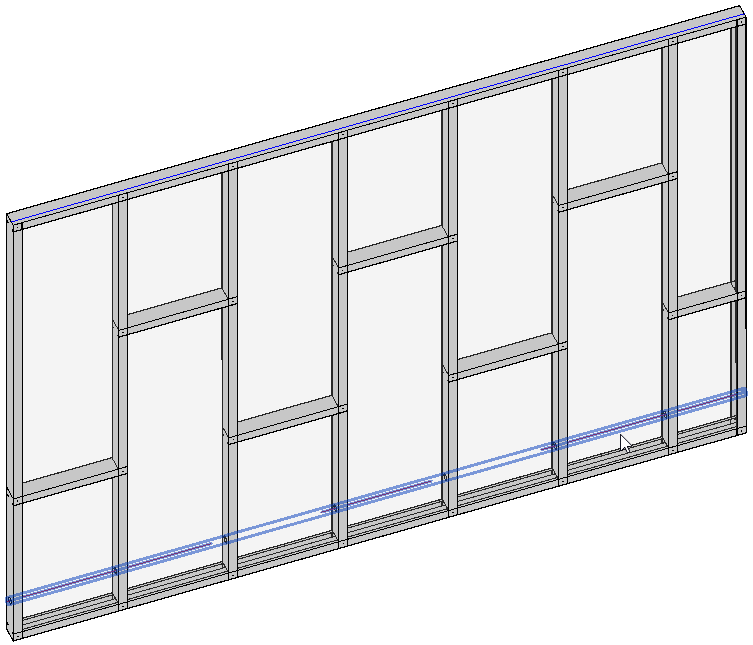
Service hole and strap families are universal can be used with all framing systems (C+U, C+C\_CH and C+C).

<figure><img src="https://239424168-files.gitbook.io/~/files/v0/b/gitbook-x-prod.appspot.com/o/spaces%2FqtUsszuAWXIZhQhrvjnb%2Fuploads%2FFuILo9BRbqjVZyIsiHeL%2Fimage.png?alt=media&#x26;token=cb7097f6-167e-43d6-81ec-c206f5d87204" alt=""><figcaption><p>Metric (left) and Imperial (right) service hole and strap families</p></figcaption></figure>

<table data-view="cards"><thead><tr><th></th><th data-hidden data-card-target data-type="content-ref"></th></tr></thead><tbody><tr><td>Service hole families</td><td><a href="service-holes">service-holes</a></td></tr><tr><td>Service hole automation</td><td><a href="../service-hole-automation">service-hole-automation</a></td></tr></tbody></table>

### Service Holes

<figure><img src="https://239424168-files.gitbook.io/~/files/v0/b/gitbook-x-prod.appspot.com/o/spaces%2FqtUsszuAWXIZhQhrvjnb%2Fuploads%2F6KDljaUoTLgiS0jB0JFr%2Fimage.png?alt=media&#x26;token=c553c900-58e0-4241-81fe-faa4f62001ee" alt=""><figcaption><p>Service hole</p></figcaption></figure>

<table data-view="cards"><thead><tr><th></th><th data-hidden data-card-target data-type="content-ref"></th></tr></thead><tbody><tr><td>How to prepare Stud service hole families for CNC export?</td><td><a href="service-holes/how-to-create-service-holes-in-vertical-studs">how-to-create-service-holes-in-vertical-studs</a></td></tr><tr><td>How to insert service holes in Studs for CNC export?</td><td><a href="../service-hole-automation/how-to-insert-service-holes-in-vertical-studs">how-to-insert-service-holes-in-vertical-studs</a></td></tr></tbody></table>

### Straps

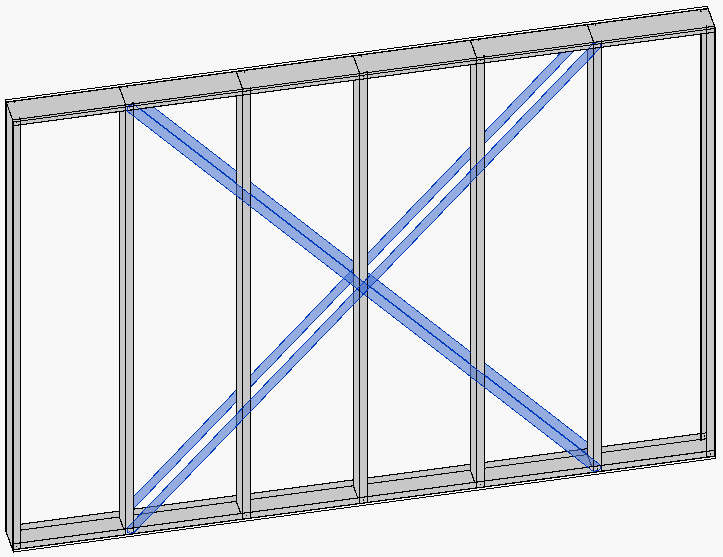
Strap families can be used for horizontal and diagonal strap bracing:

<figure><img src="https://239424168-files.gitbook.io/~/files/v0/b/gitbook-x-prod.appspot.com/o/spaces%2FqtUsszuAWXIZhQhrvjnb%2Fuploads%2F1MDlvu4hnsTmN0pGVyMr%2Fimage.png?alt=media&#x26;token=c728ca3f-bf4f-477a-832a-be143c5f112e" alt="" width="563"><figcaption><p>Horizontal straps</p></figcaption></figure>

<figure><img src="https://239424168-files.gitbook.io/~/files/v0/b/gitbook-x-prod.appspot.com/o/spaces%2FqtUsszuAWXIZhQhrvjnb%2Fuploads%2FY4BmiWVZiwjrUVlnfP7N%2Fimage.png?alt=media&#x26;token=5b8765c2-4235-4607-a1b3-d05d7fe22aa2" alt="" width="542"><figcaption><p>Diagonal straps (strap bracing)</p></figcaption></figure>

***

Learn more about the **Metal Framing** families.

{% embed url="<https://www.youtube.com/watch?v=jyutWz2FmK4>" %}

***

{% hint style="info" %}
If you can't find the answers you're looking for, please [contact our support team](https://helpdesk.besmart.software/support/tickets/new).
{% endhint %}