# Modify Configuration Settings

### **Align Stud Spacing with Frame and Openings Sides**

![](https://239424168-files.gitbook.io/~/files/v0/b/gitbook-x-prod.appspot.com/o/spaces%2FqtUsszuAWXIZhQhrvjnb%2Fuploads%2FPjNDQehUTspOVmCstoYo%2F0.jpeg?alt=media)

**Align Stud Spacing with Frame and Openings Sides** – option to align stud/joist spacing with **opening right side**, **right king-left side** or **right king-axis**.

*Example: Studs/Joists are aligned with the right side of the opening **(opening right side)**:*

![](https://239424168-files.gitbook.io/~/files/v0/b/gitbook-x-prod.appspot.com/o/spaces%2FqtUsszuAWXIZhQhrvjnb%2Fuploads%2FlAD9Icgio2zTB3NvqtFb%2F1.jpeg?alt=media)

*Example: Studs/Joists are aligned with the left side of the right king **(right king-left side)**:*

![](https://239424168-files.gitbook.io/~/files/v0/b/gitbook-x-prod.appspot.com/o/spaces%2FqtUsszuAWXIZhQhrvjnb%2Fuploads%2FNYKuawTqACNJw7fLGan1%2F2.jpeg?alt=media)

*Example: Studs/Joists are aligned with the axis of the right king **(right king-axis)**:*

![](https://239424168-files.gitbook.io/~/files/v0/b/gitbook-x-prod.appspot.com/o/spaces%2FqtUsszuAWXIZhQhrvjnb%2Fuploads%2Fz0HkYY7ILvrlVey7Sp9U%2F3.jpeg?alt=media)

### **Recalculate First/Last Stud Spacing for External Corners**

![](https://239424168-files.gitbook.io/~/files/v0/b/gitbook-x-prod.appspot.com/o/spaces%2FqtUsszuAWXIZhQhrvjnb%2Fuploads%2FGaoJQemZmJkAZUVuRXGl%2F4.jpeg?alt=media)

**Recalculate First/Last Stud Spacing for External Corners** – recalculates position of first or last stud. Ticking this option ensures good sheathing coverage from external corners.

*Example with metal frames:*

![](https://239424168-files.gitbook.io/~/files/v0/b/gitbook-x-prod.appspot.com/o/spaces%2FqtUsszuAWXIZhQhrvjnb%2Fuploads%2Fhu8g1SSZ1IPgBoGOvrg0%2F5.jpeg?alt=media)

*Example with wooden frames:*

![](https://239424168-files.gitbook.io/~/files/v0/b/gitbook-x-prod.appspot.com/o/spaces%2FqtUsszuAWXIZhQhrvjnb%2Fuploads%2FgIJNSj4Mhteew1PtWM29%2F6.jpeg?alt=media)

### **Align with Main Frame**

![](https://239424168-files.gitbook.io/~/files/v0/b/gitbook-x-prod.appspot.com/o/spaces%2FqtUsszuAWXIZhQhrvjnb%2Fuploads%2FVXiGJ03NY5pzRO7pOZUp%2F7.jpeg?alt=media)

**Align with Main Frame** – aligns frame with main frame. Mostly used for **Vertical Nailer** or **Secondary Frame** layers.

*Example with wooden frames:*

![](https://239424168-files.gitbook.io/~/files/v0/b/gitbook-x-prod.appspot.com/o/spaces%2FqtUsszuAWXIZhQhrvjnb%2Fuploads%2FJfNqLFJbWD00oKZmgEi3%2F8.jpeg?alt=media)

*Example with metal frames:*

![](https://239424168-files.gitbook.io/~/files/v0/b/gitbook-x-prod.appspot.com/o/spaces%2FqtUsszuAWXIZhQhrvjnb%2Fuploads%2FxowKosY6v0KDq7LDrJUY%2F9.jpeg?alt=media)

### **Automatically Align Opening Cripples with Studs (in Wall+, Wall+M) or Automatically Align Opening Cripples with Joists (in Floor+, Floor+M, Roof+, Roof+M)**

![](https://239424168-files.gitbook.io/~/files/v0/b/gitbook-x-prod.appspot.com/o/spaces%2FqtUsszuAWXIZhQhrvjnb%2Fuploads%2FHjPinam5tNXHBSEuoZ7d%2F10.jpeg?alt=media)

**Automatically Align Opening Cripples with Studs/Joists** – aligns cripples below and above openings with main studs/joists.

*Example: When **Automatically Align Opening Cripples with Studs/Joists** is ticked on:*

![](https://239424168-files.gitbook.io/~/files/v0/b/gitbook-x-prod.appspot.com/o/spaces%2FqtUsszuAWXIZhQhrvjnb%2Fuploads%2FIpiaNjVAPinSmD2GpEVm%2F11.jpeg?alt=media)

![](https://239424168-files.gitbook.io/~/files/v0/b/gitbook-x-prod.appspot.com/o/spaces%2FqtUsszuAWXIZhQhrvjnb%2Fuploads%2FWAfPjRdw4WxksINiCZPN%2F12.jpeg?alt=media)

### **Automatically Align Opening Cripples with Nearest Left Stud** (in Wall+, Wall+M)

### **Automatically Align Opening Cripples with Nearest Left Joist** (in Floor+, Floor+M, Roof+, Roof+M)

![](https://239424168-files.gitbook.io/~/files/v0/b/gitbook-x-prod.appspot.com/o/spaces%2FqtUsszuAWXIZhQhrvjnb%2Fuploads%2F96TsvpTjtJoMxZVYs5dV%2F13.jpeg?alt=media)

**Automatically Align Opening Cripples with Nearest Left Stud/Joist –** aligns cripples below and above openings with the nearest left stud/joist. This option is usually used when the main studs/joists are distributed from both sides.

*Example: When **Automatically Align Opening Cripples with Nearest Left Stud/Joist** is ticked on:*

![](https://239424168-files.gitbook.io/~/files/v0/b/gitbook-x-prod.appspot.com/o/spaces%2FqtUsszuAWXIZhQhrvjnb%2Fuploads%2FkfODL2ZWsOapwBGhkt6n%2F14.jpeg?alt=media)

### Allow First/Last Spacing to be up to twice size of Stud/Joist Spacing

![](https://239424168-files.gitbook.io/~/files/v0/b/gitbook-x-prod.appspot.com/o/spaces%2FqtUsszuAWXIZhQhrvjnb%2Fuploads%2FYfS9rD04MlQ6jAO7ug1h%2F15.jpeg?alt=media)

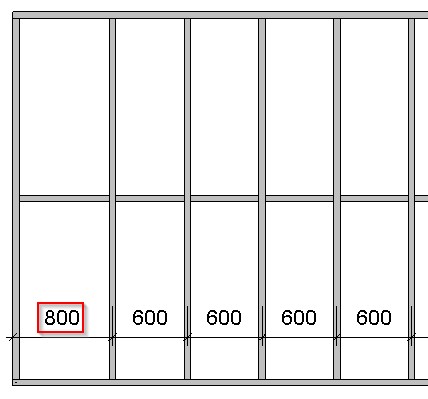
**Allow First/Last Spacing to be up to twice size of Stud/Joist Spacing** – allows changing **First/Last Spacing** from **Wall/Floor/Roof Framing** to be up to twice that of the **Stud/Joist Spacing**.

*Example with wood: When **Allow First/Last Spacing to be up to twice size of Stud/Joist Spacing** is ticked OFF:*

![](https://239424168-files.gitbook.io/~/files/v0/b/gitbook-x-prod.appspot.com/o/spaces%2FqtUsszuAWXIZhQhrvjnb%2Fuploads%2FwpPWpGfFBLxokKzdvSKZ%2F16.jpeg?alt=media)

*Example: When **Allow First/Last Spacing to be up to twice size of Stud/Joist Spacing** is ticked ON:*

![](https://239424168-files.gitbook.io/~/files/v0/b/gitbook-x-prod.appspot.com/o/spaces%2FqtUsszuAWXIZhQhrvjnb%2Fuploads%2FFsnbMkc1sS6ryRR9YwV8%2F17.jpeg?alt=media)

*Example with metal: When **Allow First/Last Spacing to be up to twice size of Stud/Joist Spacing** is ticked OFF:*

![](https://239424168-files.gitbook.io/~/files/v0/b/gitbook-x-prod.appspot.com/o/spaces%2FqtUsszuAWXIZhQhrvjnb%2Fuploads%2FOHZIZU04qhyb89tRVmen%2F18.jpeg?alt=media)

![](https://239424168-files.gitbook.io/~/files/v0/b/gitbook-x-prod.appspot.com/o/spaces%2FqtUsszuAWXIZhQhrvjnb%2Fuploads%2FvSW64Sf0UEX1QJ3B7DUk%2F19.jpeg?alt=media)

*Example: When **Allow First/Last Spacing to be up to twice size of Stud/Joist Spacing** is ticked ON:*

<figure><img src="https://239424168-files.gitbook.io/~/files/v0/b/gitbook-x-prod.appspot.com/o/spaces%2FqtUsszuAWXIZhQhrvjnb%2Fuploads%2FpPiyl8osdpfDW4cb4Qkv%2F20.jpeg?alt=media" alt=""><figcaption></figcaption></figure>

<figure><img src="https://239424168-files.gitbook.io/~/files/v0/b/gitbook-x-prod.appspot.com/o/spaces%2FqtUsszuAWXIZhQhrvjnb%2Fuploads%2FFrL1mJjYHrMc001fBdDr%2FosIhTIRXUZKdMEyAGW5F3NZAuxpPkQNtLQ.png?alt=media&#x26;token=e3fe2adc-9f32-4a12-b672-3f6f7e6fbb3c" alt=""><figcaption></figcaption></figure>

### **Delete or Move Studs when they Collide (in Wall+, Wall+M)**

### Delete or Move Joists when they Collide (in Floor+, Floor+M, Roof+, Roof+M)

<figure><img src="https://239424168-files.gitbook.io/~/files/v0/b/gitbook-x-prod.appspot.com/o/spaces%2FqtUsszuAWXIZhQhrvjnb%2Fuploads%2FhTGiB5H3WAwVpZ26qlmA%2F_3yn7SA93rt7wMz3TFzAxF3-bAGqysdBVw.png?alt=media&#x26;token=6e3fa8cc-6fb1-4e71-801d-bb4c8d17468b" alt=""><figcaption></figcaption></figure>

**Delete or Move Studs/Joists when they Collide –** choose what to do with studs/joists when they collide. (This function supports a more convenient framing workflow.)

*Example with wood wall frame from plan view: If the internal wall is moved, it collides with the existing stud. The function allows the existing stud to be deleted or moved.*

<figure><img src="https://239424168-files.gitbook.io/~/files/v0/b/gitbook-x-prod.appspot.com/o/spaces%2FqtUsszuAWXIZhQhrvjnb%2Fuploads%2FHu3Nu3aTlWBmrUQ08TsY%2FVJkAADA4T10beqeLzKP7lO3mLRyC2Cm5Cw.png?alt=media&#x26;token=89c4845d-8ea3-46d1-a796-43951ca1c834" alt=""><figcaption></figcaption></figure>

*Stud was moved:*

<figure><img src="https://239424168-files.gitbook.io/~/files/v0/b/gitbook-x-prod.appspot.com/o/spaces%2FqtUsszuAWXIZhQhrvjnb%2Fuploads%2F2LVMpmllGGambvLDZrw7%2FvEq0ecdjZhpxMZON8m_MfewYrSFycKU1Rg.png?alt=media&#x26;token=05196396-c587-49b9-87a6-e17dfc822cac" alt=""><figcaption></figcaption></figure>

*Stud was deleted:*

<figure><img src="https://239424168-files.gitbook.io/~/files/v0/b/gitbook-x-prod.appspot.com/o/spaces%2FqtUsszuAWXIZhQhrvjnb%2Fuploads%2FpL55c8VkdToACBUB4Lra%2FkOc9ZpOLWuAs_P3Rq1w6iHVo6vTOevdbhg.png?alt=media&#x26;token=0dfd1325-bc6d-4091-a02a-78c2ee7b087e" alt=""><figcaption></figcaption></figure>

*Example with metal wall frame from plan view:*

<figure><img src="https://239424168-files.gitbook.io/~/files/v0/b/gitbook-x-prod.appspot.com/o/spaces%2FqtUsszuAWXIZhQhrvjnb%2Fuploads%2FR4nEWBVpdMH11XCms1OH%2FpRDh1Fr3EP-SBvxLgb4639i9tCEslKp5Ww.png?alt=media&#x26;token=a6fb806d-2bea-4d97-96a9-b862d3c4d59a" alt=""><figcaption></figcaption></figure>

*For a more convenient framing workflow, **King Stud** stays and deletes existing **Stud** from the connection:*

<figure><img src="https://239424168-files.gitbook.io/~/files/v0/b/gitbook-x-prod.appspot.com/o/spaces%2FqtUsszuAWXIZhQhrvjnb%2Fuploads%2FHwQxHAN01znUjLozKji8%2Fimj68EvbQLLTVgiEDb-qtMXKlIJTU_D3tA.png?alt=media&#x26;token=5f172228-48fa-426d-931e-2940bd21417d" alt=""><figcaption></figcaption></figure>

*Example: The trimming joist stays while the existing joist is moved or deleted from the connection.*

<figure><img src="https://239424168-files.gitbook.io/~/files/v0/b/gitbook-x-prod.appspot.com/o/spaces%2FqtUsszuAWXIZhQhrvjnb%2Fuploads%2FhVZ2bIk4xzxuDObOBHc0%2FpPZcPGGSDM_bn5uUjBrZlT8AFR48mqPn5Q.png?alt=media&#x26;token=acdb1ea8-29e9-4b73-bcd2-d7aa843ed385" alt=""><figcaption></figcaption></figure>

### Connect Long Bridging/Nogging to Internal Opening King Joist/Stud

<figure><img src="https://239424168-files.gitbook.io/~/files/v0/b/gitbook-x-prod.appspot.com/o/spaces%2FqtUsszuAWXIZhQhrvjnb%2Fuploads%2FjspqnCPM2xjqp0VPJ17J%2FEOivH3mRhqDIphFJT2_wrfzmScjXyRYfHA.png?alt=media&#x26;token=31a7824a-7f98-4e38-905a-e261a8bed126" alt=""><figcaption></figcaption></figure>

**Connect Long Bridging/Nogging to Internal Opening King Joist/Stud** – connects bridging/nogging with internal opening king studs or trimming joists.

*Example: **Connect Long Bridging/Nogging to Internal Opening King Joist/Stud** is ticked OFF:*

<figure><img src="https://239424168-files.gitbook.io/~/files/v0/b/gitbook-x-prod.appspot.com/o/spaces%2FqtUsszuAWXIZhQhrvjnb%2Fuploads%2FHL1jau287aW37nTPzLUr%2FbdQd4CrrdUsJi55tkabxnYQ7Skn8MCvf4g.png?alt=media&#x26;token=2584155d-2a04-4e59-bd64-c274298f39cf" alt=""><figcaption></figcaption></figure>

*Example: **Connect Long Bridging/Nogging to Internal Opening King Joist/Stud** is ticked ON:*

<figure><img src="https://239424168-files.gitbook.io/~/files/v0/b/gitbook-x-prod.appspot.com/o/spaces%2FqtUsszuAWXIZhQhrvjnb%2Fuploads%2FffTL6DzOK1O2tRmCk0iM%2F9tJeBsFaMxGOujEYgN0iAlIvHdRPVgKtTg.png?alt=media&#x26;token=3d32e950-0da9-4b45-8a53-d4479149fb3a" alt=""><figcaption></figcaption></figure>

### Connect Headers to Internal King Stud/Trimming Joist

<figure><img src="https://239424168-files.gitbook.io/~/files/v0/b/gitbook-x-prod.appspot.com/o/spaces%2FqtUsszuAWXIZhQhrvjnb%2Fuploads%2FKeINXYVTKi8I63hZ6ppN%2F40o-b9JKE4mOlDt5vzOpw2nFG1DOHaElzQ.png?alt=media&#x26;token=96f92eef-a025-4221-bc15-45839a052bf5" alt=""><figcaption></figcaption></figure>

**Connect Headers to Internal King Stud/Trimming Joist** – headers can be connected to internal or external kings or trimming joists.

*Example with wood: **Connect Headers to Internal King Stud/Trimming Joist** is ticked OFF:*

<figure><img src="https://239424168-files.gitbook.io/~/files/v0/b/gitbook-x-prod.appspot.com/o/spaces%2FqtUsszuAWXIZhQhrvjnb%2Fuploads%2FMFOf7rfZyvumxuLH0l9q%2FEtCqv-BYj9Z2iIA3GLpOw3DdMBEhFdG1Ug.png?alt=media&#x26;token=912c9707-b45b-47d3-b38c-f363b7c8baa4" alt=""><figcaption></figcaption></figure>

*Example: **Connect Headers to Internal King Stud/Trimming Joist** is ticked ON:*

<figure><img src="https://239424168-files.gitbook.io/~/files/v0/b/gitbook-x-prod.appspot.com/o/spaces%2FqtUsszuAWXIZhQhrvjnb%2Fuploads%2FPdJOCVauo91vr90a81oq%2FXtcXBMCP5j7ZtAHBQ9uNyPyAka3QdVBC8Q.png?alt=media&#x26;token=1b512f6a-426c-4262-9166-eeb2b0d765ba" alt=""><figcaption></figcaption></figure>

*Example with metal:*

<figure><img src="https://239424168-files.gitbook.io/~/files/v0/b/gitbook-x-prod.appspot.com/o/spaces%2FqtUsszuAWXIZhQhrvjnb%2Fuploads%2F2LoCoygNbdnBYTZ7W7G9%2Fy10AT8R35WfWhCf1vwFyt7Em0dEFSVTmCw.png?alt=media&#x26;token=e065aa10-60e9-4f59-a2b9-4a165dcd1192" alt=""><figcaption></figcaption></figure>

### Connect Top Plate Support Headers to Internal King Stud/Trimming Joist

<figure><img src="https://239424168-files.gitbook.io/~/files/v0/b/gitbook-x-prod.appspot.com/o/spaces%2FqtUsszuAWXIZhQhrvjnb%2Fuploads%2FaOQaeCMVnivNNegapSSo%2FiMlA4wWWUL9_eN606R3QpT8IUNXSUpTuAg.png?alt=media&#x26;token=b99e7113-e04d-4df9-9755-ec6e08c4a504" alt=""><figcaption></figcaption></figure>

**Connect Top Plate Support Headers to Internal King Stud/Trimming Joist** – top plate supports can be connected to internal or external kings or trimming joists.

*Example: **Connect Top Plate Support Headers to Internal King Stud/Trimming Joist** is ticked OFF:*

<figure><img src="https://239424168-files.gitbook.io/~/files/v0/b/gitbook-x-prod.appspot.com/o/spaces%2FqtUsszuAWXIZhQhrvjnb%2Fuploads%2FmkZiRXbtrvG0QVacIKK1%2FHsp8sLs-V_IYn9A-pFscPvzRtyW4l00XkA.png?alt=media&#x26;token=0d67268d-1d3c-440a-86d8-ab9e64871aaf" alt=""><figcaption></figcaption></figure>

*Example: **Connect Top Plate Support Headers to Internal King Stud/Trimming Joist** is ticked ON:*

<figure><img src="https://239424168-files.gitbook.io/~/files/v0/b/gitbook-x-prod.appspot.com/o/spaces%2FqtUsszuAWXIZhQhrvjnb%2Fuploads%2FOA1zeqzZimCi9TYCuvJG%2FLKKRQ0iUSvYfM52dQrkZYgh4o4HCxhNYrQ.png?alt=media&#x26;token=2441fe5a-6ef7-4f10-b4b2-0845bdd463e2" alt=""><figcaption></figcaption></figure>

### Separate Joined Opening's Preassemblies

<figure><img src="https://239424168-files.gitbook.io/~/files/v0/b/gitbook-x-prod.appspot.com/o/spaces%2FqtUsszuAWXIZhQhrvjnb%2Fuploads%2FOKE9fFw24wIAVUs5GPuD%2F3epW5W0j6Dq75FqniYonwAJMIzcwUpHSRQ.png?alt=media&#x26;token=9b478487-ab15-448f-b900-b1f45dedad22" alt=""><figcaption></figcaption></figure>

**Separate Joined Opening's Preassemblies** **–** this feature lets you make separate preassemblies for openings that are part of a joined opening — and the preassemblies will exclude other elements (like top plate supports, etc.) that extend across the joined opening.

### Top Plate Support: Select Configuration by Full Width of Joined Opening

<figure><img src="https://239424168-files.gitbook.io/~/files/v0/b/gitbook-x-prod.appspot.com/o/spaces%2FqtUsszuAWXIZhQhrvjnb%2Fuploads%2F3NiXSwpQo6ASxWMfRH3a%2F2HbYlJadFBkC2zOEF5JZV6wsxlia4ubYxw.png?alt=media&#x26;token=d01fce45-5537-46a9-8dc4-b3a3a960fa5d" alt=""><figcaption></figcaption></figure>

**Top Plate Support: Select Configuration by Full Width of Joined Opening –** top plate support can be created according to opening width or full width of joined openings.

*Example with wood:*

<figure><img src="https://239424168-files.gitbook.io/~/files/v0/b/gitbook-x-prod.appspot.com/o/spaces%2FqtUsszuAWXIZhQhrvjnb%2Fuploads%2F6lOj85IslNQBcc5661RI%2FR5dCQSCErKpTF8ahr9wOeo8Z7BP5WYnGcQ.png?alt=media&#x26;token=6cc40915-2dd6-4f35-b43a-8adba1373417" alt=""><figcaption></figcaption></figure>

<figure><img src="https://239424168-files.gitbook.io/~/files/v0/b/gitbook-x-prod.appspot.com/o/spaces%2FqtUsszuAWXIZhQhrvjnb%2Fuploads%2FdCPpph0AGyyBL3gmuMHn%2Fsb-APE9U7YDyjgBcf4Z4A0TuJCeQfRtHSQ.png?alt=media&#x26;token=eea5c846-74e9-47a8-96d6-5b8023927f35" alt=""><figcaption></figcaption></figure>

*Example with metal:*

<figure><img src="https://239424168-files.gitbook.io/~/files/v0/b/gitbook-x-prod.appspot.com/o/spaces%2FqtUsszuAWXIZhQhrvjnb%2Fuploads%2FPoMX44HjxNIgRktWp0eh%2FLuXtPnn2PxCH0zHCIS3tGqW6FN3sav4wWg.png?alt=media&#x26;token=48491b41-74d1-472f-9366-3c61c496771f" alt=""><figcaption></figcaption></figure>

<figure><img src="https://239424168-files.gitbook.io/~/files/v0/b/gitbook-x-prod.appspot.com/o/spaces%2FqtUsszuAWXIZhQhrvjnb%2Fuploads%2FgkP2CEl7ik1xEkxklJGT%2FPoMkARnik2hvospo1GXnMIau0-NTFO37bQ.png?alt=media&#x26;token=edcfad2c-2a27-4db9-acae-1ee43032540b" alt=""><figcaption></figcaption></figure>

### King\Trimmer: Select Configuration by Full Width of Joined Opening

<figure><img src="https://239424168-files.gitbook.io/~/files/v0/b/gitbook-x-prod.appspot.com/o/spaces%2FqtUsszuAWXIZhQhrvjnb%2Fuploads%2F68YlbIPa8e0NulJXQ6dX%2F3NrW6FjlUHHGvP61PIAzAY9rereDuLAftw.png?alt=media&#x26;token=cbff494b-a361-4f11-a601-e408e9c587ee" alt=""><figcaption></figcaption></figure>

**King\Trimmer: Select Configuration by Full Width of Joined Opening** **–** kings or trimmers can be created according to opening width or full width of joined openings.

### Header: Select Configuration by Full Width of Joined Opening

<figure><img src="https://239424168-files.gitbook.io/~/files/v0/b/gitbook-x-prod.appspot.com/o/spaces%2FqtUsszuAWXIZhQhrvjnb%2Fuploads%2Fij77p2u0sEWjIAPkhagr%2FtrWPCcAlL75ssB3wg-RbZNw9GyiZ3oO3Cw.png?alt=media&#x26;token=a96bb51c-7cf4-4117-9489-4db3d3b761e8" alt=""><figcaption></figcaption></figure>

**Header: Select Configuration by Full Width of Joined Opening** – header can be created according to opening width or full width of joined openings.

### Allow Brace and Opening Intersection

<figure><img src="https://239424168-files.gitbook.io/~/files/v0/b/gitbook-x-prod.appspot.com/o/spaces%2FqtUsszuAWXIZhQhrvjnb%2Fuploads%2Fo5ILpw1CF9Upk1ppN1hm%2F8nlnpU5BlDz9rBl2J6by3AHkSEZpvMVC1g.png?alt=media&#x26;token=105c6797-7f61-47d1-ada3-18530a6d86fd" alt=""><figcaption></figcaption></figure>

**Allow Brace and Opening Intersection** – if ticked, allows to create braces which crosses openings. This option is usually used when prefabricated frame is transported and braces could go through openings to make the frame more stable.

*Example:*

<figure><img src="https://239424168-files.gitbook.io/~/files/v0/b/gitbook-x-prod.appspot.com/o/spaces%2FqtUsszuAWXIZhQhrvjnb%2Fuploads%2FrUURe0fG5faYunrGmKpy%2Fdhv8vAQpuvYusdH2sbIC9IqLzLrHIqogIw.png?alt=media&#x26;token=f5311e1c-3050-4adb-8281-5542185f45b3" alt=""><figcaption></figcaption></figure>

### Minimum Window/Door/Generic/System Opening Width\Height

<figure><img src="https://239424168-files.gitbook.io/~/files/v0/b/gitbook-x-prod.appspot.com/o/spaces%2FqtUsszuAWXIZhQhrvjnb%2Fuploads%2FppdvM485b2VPCfLDoLpC%2Fql76WpxGhUlIxL3okHj1dlJTmOSCuQuieQ.png?alt=media&#x26;token=58eb0f90-93bd-48e4-ac76-7471633fc178" alt=""><figcaption></figcaption></figure>

**Minimum Window/Door/Generic/System Opening Width\Height** – define minimal sizes for windows, doors, generic or system openings which will be framed.

*Example, Minimum System Opening Width\Height = 0, then the* *opening is framed:*

<figure><img src="https://239424168-files.gitbook.io/~/files/v0/b/gitbook-x-prod.appspot.com/o/spaces%2FqtUsszuAWXIZhQhrvjnb%2Fuploads%2FTarwJgFMQpZPTsM3am5J%2Fg-E0Gxfm0ZxonqIcMX1VOg15n5Ts0cx-Sg.png?alt=media&#x26;token=89e8c12d-23c1-46de-85ad-0221384e19ef" alt=""><figcaption></figcaption></figure>

*Example, Minimum System Opening Width\Height = 310, then the* *opening is not framed:*

<figure><img src="https://239424168-files.gitbook.io/~/files/v0/b/gitbook-x-prod.appspot.com/o/spaces%2FqtUsszuAWXIZhQhrvjnb%2Fuploads%2F8h44v7iBrrQPrbJzTlLr%2FyhnewzfyclvAcziPPjBl3dHo9VmcV5yGiw.png?alt=media&#x26;token=7b36b86c-b0ba-4498-8efe-5d6bc2859c2c" alt=""><figcaption></figcaption></figure>

### Enable Partial Opening Analysis

<figure><img src="https://239424168-files.gitbook.io/~/files/v0/b/gitbook-x-prod.appspot.com/o/spaces%2FqtUsszuAWXIZhQhrvjnb%2Fuploads%2Fc9whvY7R0s4J3RGopkIS%2FtEfeFjcVRociEawja0KqYEKrMs8BTi_Ecw.png?alt=media&#x26;token=a44bac03-2ac6-4c7e-b0d3-d13520195334" alt=""><figcaption></figcaption></figure>

**Enable Partial Opening Analysis** – turns on more complicated calculation method and analysis for the frame when openings are created just for few roof layers. This method is quite rare and slows down framing speed, so could be switched on separately.

### Enable New Algorithm for Wood Framing using New Families

<figure><img src="https://239424168-files.gitbook.io/~/files/v0/b/gitbook-x-prod.appspot.com/o/spaces%2FqtUsszuAWXIZhQhrvjnb%2Fuploads%2FJp22WiaqBFaPrK2phldP%2FnqZQyzfDKxYPLQTp7_hfQiVsiNbTDFjCvA.png?alt=media&#x26;token=52b5a8aa-6aa8-4428-8fdd-42ca66b27918" alt=""><figcaption></figcaption></figure>

**Enable New Algorithm for Wood Framing using New Families** – enables new, faster algorithm for wood framing using new families from new version. This option is automatically switched after installing new **Wall+**, **Floor+**, **Roof+** version with new configurations. The new families are easier to use than the old ones that they have replaced, and you’ll find that they greatly expand your framing possibilities.

Advantages of the new families:

The new families are simple and speed up wall/floor/roof framing by a factor of 2.

The new families replace and expand the possibilities of the old families.

The new framing technology is more flexible, making it possible to get good results in all situations faster than using the old families.

Here is a side-by-side list of the new **Wood Framing Roof+** families and the old families being replaced in Imperial projects. (For Metric projects, there will be M\_ at the beginning):

| New families for new Roof+2021 configurations                                                                                                                                                  | Old families for old configurations                                                                                                                                                                                                                                                                                                                                                                                                                                                                                                       |
| ---------------------------------------------------------------------------------------------------------------------------------------------------------------------------------------------- | ----------------------------------------------------------------------------------------------------------------------------------------------------------------------------------------------------------------------------------------------------------------------------------------------------------------------------------------------------------------------------------------------------------------------------------------------------------------------------------------------------------------------------------------- |
| **I\_RWF Common Joist.rfa**                                                                                                                                                                    | <p>I\_Roof\_Frame Common Rafter.rfa</p><p>I\_Roof\_Frame Common Joist.rfa</p>                                                                                                                                                                                                                                                                                                                                                                                                                                                             |
| **I\_RWF Rim-Bridging Joist.rfa**                                                                                                                                                              | <p>I\_Roof\_Frame Valley\_Hip Board.rfa</p><p>I\_Roof\_Frame Trimmer.rfa</p><p>I\_Roof\_Frame Trimmer Joist.rfa</p><p>I\_Roof\_Frame Trapezoid Girder Joist.rfa</p><p>I\_Roof\_Frame Top Trimmer\_Bevelled.rfa</p><p>I\_Roof\_Frame Top Trimmer.rfa</p><p>I\_Roof\_Frame Top Trap\_Trimmer.rfa</p><p>I\_Roof\_Frame Horizontal Board.rfa</p><p>I\_Roof\_Frame Header.rfa</p><p>I\_Roof\_Frame Fascia & Trimmer.rfa</p><p>I\_Roof\_Frame Brace Board.rfa</p><p>I\_Roof\_Frame Bottom Trimmer.rfa</p><p>I\_Roof\_Frame Batten Joist.rfa</p> |
| <p><strong>I\_RWF Rim-Bridging I-Joist.rfa</strong></p><p><strong>I\_RWF Common I-Joist.rfa</strong></p>                                                                                       | <p>I\_Roof\_Frame Trimmer I-Joist.rfa</p><p>I\_Roof\_Frame Common Rafter I-Joist.rfa</p><p>I\_Roof\_Frame Common I-Joist.rfa</p>                                                                                                                                                                                                                                                                                                                                                                                                          |
| <p><strong>I\_RWF Valley Rafter.rfa</strong></p><p><strong>I\_RWF Valley Rafter I-Joist.rfa I\_RWF Hip Rafter.rfa</strong></p><p><strong>I\_RWF Hip Rafter I-Joist.rfa</strong></p>            | <p>I\_Roof\_Frame Valley Rafter.rfa</p><p>I\_Roof\_Frame Valley Rafter I-Joist.rfa I\_Roof\_Frame Hip Rafter.rfa</p><p>I\_Roof\_Frame Hip Rafter I-Joist.rfa</p>                                                                                                                                                                                                                                                                                                                                                                          |
| <p><strong>I\_RWF\_Joist Diagonal Cut.rfa</strong></p><p><strong>I\_RWF\_Joist Bottom Cut.rfa</strong></p>                                                                                     |                                                                                                                                                                                                                                                                                                                                                                                                                                                                                                                                           |
| <p><strong>I\_RWF Soffit Board\_Profiled.rfa</strong></p><p><strong>I\_RWF Soffit Board.rfa</strong></p><p><strong>I\_RWF Soffit Board\_Groove.rfa</strong></p>                                | <p>I\_Roof\_Frame Soffit Board\_MultiProfile.rfa</p><p>I\_Roof\_Frame Soffit Board.rfa</p><p>I\_Roof\_Frame Groove Board.rfa</p>                                                                                                                                                                                                                                                                                                                                                                                                          |
| <p><strong>I\_RWF Ridge Joist.rfa</strong></p><p><strong>I\_RWF Girder Joist.rfa</strong></p><p><strong>I\_RWF Ridge I-Joist.rfa</strong></p><p><strong>I\_RWF Girder I-Joist.rfa</strong></p> | <p>I\_Roof\_Frame Ridge Joist\_Bevelled\_Spec.rfa</p><p>I\_Roof\_Frame Ridge Joist\_Bevelled.rfa</p><p>I\_Roof\_Frame Ridge Joist.rfa</p><p>I\_Roof\_Frame Ridge I-Joist.rfa</p><p>I\_Roof\_Frame Girder Joist\_Bevelled.rfa</p><p>I\_Roof\_Frame Girder Joist.rfa</p><p>I\_Roof\_Frame Trapezoid Girder Joist.rfa</p>                                                                                                                                                                                                                    |
| <p><strong>I\_RWF Collar Joist.rfa</strong></p><p><strong>I\_RWF Collar I-Joist.rfa</strong></p><p><strong>I\_RWF Sleeper.rfa</strong></p>                                                     | <p>I\_Roof\_Frame Collar Joist.rfa</p><p>I\_Roof\_Frame Collar I-Joist.rfa</p><p>I\_Roof\_Frame Sleeper Board.rfa</p>                                                                                                                                                                                                                                                                                                                                                                                                                     |

Here are the new framing configurations that we prepared to speed up your project. Again, they come with the new families:

<figure><img src="https://239424168-files.gitbook.io/~/files/v0/b/gitbook-x-prod.appspot.com/o/spaces%2FqtUsszuAWXIZhQhrvjnb%2Fuploads%2FTsBRcmfNPdTPlk6Fk7Nu%2FnPVoixDMpSKJ6wR8vUM5CVecyORUpy2N-Q.png?alt=media&#x26;token=2cf112f4-7087-4ce4-8547-375c67461602" alt=""><figcaption></figcaption></figure>

*Example: all these different blockings and headers were created using just one family:*

<figure><img src="https://239424168-files.gitbook.io/~/files/v0/b/gitbook-x-prod.appspot.com/o/spaces%2FqtUsszuAWXIZhQhrvjnb%2Fuploads%2Fss9VDJOsC9fPbqrHDqcu%2FM5rhuMkVg_kr-xK1Bt6HzyuZ3v7wRcWxPQ.png?alt=media&#x26;token=800f2128-050b-452c-ab8c-cc3eb38d6c6e" alt=""><figcaption></figcaption></figure>

Related blogpost:

[**http://www.aga-cad.com/blog/wood-framing-roof-for-revit-new-families-new-version-new-features (http://www.agacad.com/blog/wood-framing-roof-for-revit-new-families-new-version-new-features)**](http://www.aga-cad.com/blog/wood-framing-roof-for-revit-new-families-new-version-new-features)

### **Minimal Top/Bottom Cripple Stud "Cut Length"&#x20;*****(in Wall+, Wall+M) or***

### Minimal Top/Bottom Tile Joist "Cut Length" *(in Floor+, Floor+M, Roof+, Roof+M)*

<figure><img src="https://239424168-files.gitbook.io/~/files/v0/b/gitbook-x-prod.appspot.com/o/spaces%2FqtUsszuAWXIZhQhrvjnb%2Fuploads%2FzSlWXqXJ7DIZruk6qbk5%2FLxGapsn5vtkXft_0co2_Codl76f2RR0bTw.png?alt=media&#x26;token=2af2e624-83ab-4d4c-ba7c-812c9afa30ce" alt=""><figcaption></figcaption></figure>

**Minimal Top/Bottom Cripple Stud/Tile Joist "Cut Length"** – defines the minimum top/bottom cripple/tile joist cut length.

**Delete Cripple Studs/Tile Joists if "Cut Length" is Less than Minimal** – deletes cripples/tile joists if length is less than the value under **Minimal Top/Bottom Cripple Stud/Tile Joists "Cut Length"**.

*Example: Top cripples studs have been deleted because length was less than 50:*

<figure><img src="https://239424168-files.gitbook.io/~/files/v0/b/gitbook-x-prod.appspot.com/o/spaces%2FqtUsszuAWXIZhQhrvjnb%2Fuploads%2FNxsuWvihrpqB2yDu2Gci%2FQ_zqVDgl2Ylr1iaOOXsXXuuGlMOrbf8Uvw.png?alt=media&#x26;token=543525cc-e1ae-4c18-a669-68d184708167" alt=""><figcaption></figcaption></figure>

### Minimal Top/Bottom Trimmer "Cut Length"

<figure><img src="https://239424168-files.gitbook.io/~/files/v0/b/gitbook-x-prod.appspot.com/o/spaces%2FqtUsszuAWXIZhQhrvjnb%2Fuploads%2F8qhI2qUbtWhqswY4ptmf%2F50JicHreqyzBxmOYkG037HHze_orRBtqiA.png?alt=media&#x26;token=8f9af9eb-cb58-4c85-86e0-0ca5178e3853" alt=""><figcaption></figcaption></figure>

**Minimal Top/Bottom Trimmer "Cut Length"** – defines the minimum top/bottom trimmer cut length.

**Delete Top/Bottom Trimmer Studs if "Cut Length" is Less than Minimal** – deletes trimmers if length is less than the value under **Minimal Top/Bottom Trimmer "Cut Length"**.

*Example: Top trimmers have been deleted because length was less than 50:*

<figure><img src="https://239424168-files.gitbook.io/~/files/v0/b/gitbook-x-prod.appspot.com/o/spaces%2FqtUsszuAWXIZhQhrvjnb%2Fuploads%2FwWEb3sSlBy9nA5EbjPP9%2FMZ-xfpbQ-H8bR3AiDzVE9mt88fdBAE4LMw.png?alt=media&#x26;token=f895f472-657c-450a-a6e2-a183010f35d1" alt=""><figcaption></figcaption></figure>

### Minimal Rim Joist Length *(in Floor+, Floor+M, Roof+, Roof+M) or*

### Minimal Plate Length *(in Wall+, Wall+M)*

<figure><img src="https://239424168-files.gitbook.io/~/files/v0/b/gitbook-x-prod.appspot.com/o/spaces%2FqtUsszuAWXIZhQhrvjnb%2Fuploads%2FCemhK8jKoNzi7x6m662c%2Fglp_HFJG8viudR3Rh8qiDmYRdfHxObDc8A.png?alt=media&#x26;token=b884dfbe-d365-498b-a5df-c2c399bad512" alt=""><figcaption></figcaption></figure>

**Minimal Rim Joist Length** or **Minimal Rim Joist Length** – defines the minimum length for the rim joist (in floors and roofs) or plate (in walls). If a length is less than the defined value, then the element will not be created.

*Example: No top rim joist was created because the length is less than 500:*

<figure><img src="https://239424168-files.gitbook.io/~/files/v0/b/gitbook-x-prod.appspot.com/o/spaces%2FqtUsszuAWXIZhQhrvjnb%2Fuploads%2FNItYBGT5prfKwkir3IwS%2FgkTgjPBK--1ZUFb1PJBMqYAaWf50UNrT8w.png?alt=media&#x26;token=d7a3f68d-6e06-41f3-9b79-34fbbe629064" alt=""><figcaption></figcaption></figure>

### Minimal Bridging Length

<figure><img src="https://239424168-files.gitbook.io/~/files/v0/b/gitbook-x-prod.appspot.com/o/spaces%2FqtUsszuAWXIZhQhrvjnb%2Fuploads%2FZKSvFfVkILFAq6d3YbxD%2FeAv_WIT0pGDw8xf3y-HegxZJXAYSz5IPfg.png?alt=media&#x26;token=ed7aae46-2caa-4dda-9511-8b35020f05c1" alt=""><figcaption></figcaption></figure>

**Minimal Bridging Length** – defines the minimum length for the bridging. If a length is less than the defined value, then the element will not be created.

*Example: No bridging was created in the red box because the length is less than 100:*

<figure><img src="https://239424168-files.gitbook.io/~/files/v0/b/gitbook-x-prod.appspot.com/o/spaces%2FqtUsszuAWXIZhQhrvjnb%2Fuploads%2FMsTx9iWkSRLLUBZ5831p%2Fadff1VW3LoCNPTvPdEWaO1R99FHGmz6Uww.png?alt=media&#x26;token=598b5be3-d76b-46d9-975b-3932903aefcc" alt=""><figcaption></figcaption></figure>

### Minimal Stud/Joist Length

<figure><img src="https://239424168-files.gitbook.io/~/files/v0/b/gitbook-x-prod.appspot.com/o/spaces%2FqtUsszuAWXIZhQhrvjnb%2Fuploads%2F6zn5sefZghJXS9zAG1KU%2F9zjFQHZyUKChYIGAHYOsUkeJDoQ79UQQMA.png?alt=media&#x26;token=02c7cd5d-7bf9-4e13-b568-de56c656622b" alt=""><figcaption></figcaption></figure>

**Minimal Stud/Joist Length** – defines the minimum length for stud/joist. If a length is less than the defined value, then the element will not be created.

*Example: No studs were created because the length is less than 500:*

<figure><img src="https://239424168-files.gitbook.io/~/files/v0/b/gitbook-x-prod.appspot.com/o/spaces%2FqtUsszuAWXIZhQhrvjnb%2Fuploads%2FF3ITJZwlCoCbQVZ1qHOy%2FFFsfJXoQR4g9SWJHOyYuNQlblKMUFT21-Q.png?alt=media&#x26;token=822e9db8-1778-4d5d-ac57-eb3029c4a255" alt=""><figcaption></figcaption></figure>

### **Split the Siding Strip if Width is less than** *(in Wall+, Wall+M) or*

### **Split the Flooring Strip if Width is less than** *(in Floor+, Floor+M) or*

### Split the Roofing Strip if Width is less than *(in Roof+, Roof+M)*

<figure><img src="https://239424168-files.gitbook.io/~/files/v0/b/gitbook-x-prod.appspot.com/o/spaces%2FqtUsszuAWXIZhQhrvjnb%2Fuploads%2FD69YCYzRVI8xa7uXtX2r%2FxQrwIQroYk8PwxzqkaElZq4lg8tFtapUlQ.png?alt=media&#x26;token=1289c00b-5c0f-4219-909a-4e9b28df7712" alt=""><figcaption></figcaption></figure>

**Split the Siding/Flooring/Roofing Strip if Width is less than** – defines the rule when siding/flooring/roofing strip must be split or cut near the opening.

*Example: **Split the Siding/Flooring/Roofing Strip if Width is less than** - 20:*

<figure><img src="https://239424168-files.gitbook.io/~/files/v0/b/gitbook-x-prod.appspot.com/o/spaces%2FqtUsszuAWXIZhQhrvjnb%2Fuploads%2F74imBMHBJVk7GQop4Ofp%2FM6K4cxN8NHOht4WZAAxBRkD9DFYSkoiwNA.png?alt=media&#x26;token=1c5adaa4-73b2-465c-9607-4a2811783f09" alt=""><figcaption></figcaption></figure>

*Example: **Split the Siding/Flooring/Roofing Strip if Width is less than** - 80:*

<figure><img src="https://239424168-files.gitbook.io/~/files/v0/b/gitbook-x-prod.appspot.com/o/spaces%2FqtUsszuAWXIZhQhrvjnb%2Fuploads%2FbN7dsuNNCxoKyQFdfY3b%2FwlDR5gxggey7fb6Crb9b0RYe5MLZQc3s5g.png?alt=media&#x26;token=d867f906-e6df-4d31-b19a-bb1fef6619bb" alt=""><figcaption></figcaption></figure>

### **Minimal Siding Support Width for the Last Row (in Wall+, Wall+M) or**

### **Minimal Flooring Support Width for the Last Row** *(in Floor+, Floor+M)*

### **Minimal Roofing Support Width for the Last Row** *(in Roof+, Roof+M)*

<figure><img src="https://239424168-files.gitbook.io/~/files/v0/b/gitbook-x-prod.appspot.com/o/spaces%2FqtUsszuAWXIZhQhrvjnb%2Fuploads%2FHqrIkeZsQS13TL4ivbMz%2FC5bWJfRNdCZBLMisUw8fP76RJylO7iEFmQ.png?alt=media&#x26;token=fb0512f0-866d-407d-abed-8798cf50485b" alt=""><figcaption></figcaption></figure>

**Minimal Siding/Flooring/Roofing Support Width for the Last Row** – defines the rule when last siding/flooring row must be created or deleted.

*Example: **Minimal Siding/Flooring/Roofing Support Width for the Last Row** = 0, so the last siding exists:*

<figure><img src="https://239424168-files.gitbook.io/~/files/v0/b/gitbook-x-prod.appspot.com/o/spaces%2FqtUsszuAWXIZhQhrvjnb%2Fuploads%2FdmY5AToVb8y3Rj7HCNXL%2FC1qgz69WupMkQs3uh8poJSyzmCpaIHLGxg.png?alt=media&#x26;token=070cec3d-ca0c-4bfa-b893-c0c0a159f47a" alt=""><figcaption></figcaption></figure>

*Example: **Minimal Siding/Flooring/Roofing Support Width for the Last Row** = 100, so the last siding was NOT created:*

<figure><img src="https://239424168-files.gitbook.io/~/files/v0/b/gitbook-x-prod.appspot.com/o/spaces%2FqtUsszuAWXIZhQhrvjnb%2Fuploads%2F7Sp6ybInXD6zU1due9RS%2FtbRnNTnZFp33xqpNlKSweYQ4Yx9RkmpsQA.png?alt=media&#x26;token=7b84c3be-1de3-4de2-98ba-04427f2fa41d" alt=""><figcaption></figcaption></figure>

### **Minimal/Maximal Length of Split Plate (in Wall+, Wall+M) or**

### **Minimal/Maximal Length of Split Rim/Joist** *(in Floor+, Floor+M, Roof+, Roof+M)*

<figure><img src="https://239424168-files.gitbook.io/~/files/v0/b/gitbook-x-prod.appspot.com/o/spaces%2FqtUsszuAWXIZhQhrvjnb%2Fuploads%2F1Z5ZQHz83brgV5alOR7n%2FNwB6bom28Ow2PcH9lDXHa8PE8OG9Oq8PEw.png?alt=media&#x26;token=0e725f22-21d0-4695-9c7a-ba50ad562492" alt=""><figcaption></figcaption></figure>

**Minimal/Maximal Length of Split Plate/Rim/Joist** – predefines min/max length for splitting top/bottom plates. **Wall+**, **Floor+** or **Roof+** → **Align/Trim/Extend** → **Split Elements → Split Top/Bottom Plates Automatically** splits elements according to this setting.

*Example with wood:*

<figure><img src="https://239424168-files.gitbook.io/~/files/v0/b/gitbook-x-prod.appspot.com/o/spaces%2FqtUsszuAWXIZhQhrvjnb%2Fuploads%2FHB29LyYi1dS1F8fKRiSK%2FYHbOvSrYw7uqI129BEpZUu0hNOAbKxae-g.png?alt=media&#x26;token=a9e0d167-ada0-4f55-839f-167474d46f86" alt=""><figcaption></figcaption></figure>

*Example with metal:*

<figure><img src="https://239424168-files.gitbook.io/~/files/v0/b/gitbook-x-prod.appspot.com/o/spaces%2FqtUsszuAWXIZhQhrvjnb%2Fuploads%2F5UBQpGtgFSCHDreEHK3u%2FEpyxGjLbXdmjHHrcrMcO8vbtQZiOJ5OUQw.png?alt=media&#x26;token=212efd15-cdc5-4cad-8661-9947e8a84a3a" alt=""><figcaption></figcaption></figure>

### Maximal Length of Cover Plate/Joist

<figure><img src="https://239424168-files.gitbook.io/~/files/v0/b/gitbook-x-prod.appspot.com/o/spaces%2FqtUsszuAWXIZhQhrvjnb%2Fuploads%2Fcf9LlkJ0vATXZdiREQo5%2F0O0b5gQgvR5C-5q4zF6tNAv423aAsX2tTA.png?alt=media&#x26;token=0a5ed74f-e656-403c-bdf6-052251b3da0d" alt=""><figcaption></figcaption></figure>

**Maximal Length of Cover Plate/Joist** – predefines maximal length for splitting cover plates\joists. **Wall+**, **Floor+** or **Roof+** → **Align/Trim/Extend** → **Split Elements → Split Rim Joists Automatically** splits elements according to this setting.

<figure><img src="https://239424168-files.gitbook.io/~/files/v0/b/gitbook-x-prod.appspot.com/o/spaces%2FqtUsszuAWXIZhQhrvjnb%2Fuploads%2FLFeTipLi2LgW7vha2Qal%2Flap94gxKSJwpxocDKZDS251PuFKmOPyZkA.png?alt=media&#x26;token=1fc20ee5-9880-4078-af51-91225fc2f3f4" alt=""><figcaption></figcaption></figure>

### Offset Distance of Split

<figure><img src="https://239424168-files.gitbook.io/~/files/v0/b/gitbook-x-prod.appspot.com/o/spaces%2FqtUsszuAWXIZhQhrvjnb%2Fuploads%2FHPRQf1vUw9sCvJuxc6Sb%2FcO0CshNzWdqTnp5Bodczx_YAazsfzQqbvA.png?alt=media&#x26;token=ab0fb315-0840-453f-a041-da0ef6250186" alt=""><figcaption></figcaption></figure>

**Offset Distance of Split** – defines splitting distance for the selected top/bottom plate from the selected stud. **Wall+, Floor+** or **Roof+ → Align/Trim/Extend → Split Elements** → **Split Top/Bottom Plate Manually** splits selected top/bottom plate by selected stud according to this setting.

*Example: Bottom plate is split a distance of 300 from the stud:*

<figure><img src="https://239424168-files.gitbook.io/~/files/v0/b/gitbook-x-prod.appspot.com/o/spaces%2FqtUsszuAWXIZhQhrvjnb%2Fuploads%2F13A9EfHqos5bOOh6pR57%2FvozW4oHMITBjcEyk0rJaueF2_UDftMectA.png?alt=media&#x26;token=05855532-cbd4-49fb-a81f-de66b9dc865c" alt=""><figcaption></figcaption></figure>

### Special Split Rule

<figure><img src="https://239424168-files.gitbook.io/~/files/v0/b/gitbook-x-prod.appspot.com/o/spaces%2FqtUsszuAWXIZhQhrvjnb%2Fuploads%2FM02jgkR5mYDzNL7d2RDK%2FQksELWNaDStugUVZ_P4pEzZ3NcsZvGQUSw.png?alt=media&#x26;token=ee30650c-de98-406b-a9aa-f15f30328418" alt=""><figcaption></figcaption></figure>

**Special Split Rule** – splits rim joists according to **Maximal Length of Split Rim/Joist** setting value. **Floor+** → **Add Elements** → **Split Elements → Split Rim Joists Automatically** splits elements according to this setting.

*Example: Rim joist was split when **Maximal Length of Split Rim/Joist** = 1500:*

<figure><img src="https://239424168-files.gitbook.io/~/files/v0/b/gitbook-x-prod.appspot.com/o/spaces%2FqtUsszuAWXIZhQhrvjnb%2Fuploads%2FODyDUu0l4k83ipKiiEVH%2FIThq83NCpSVIqH-KmKSctHZZl35WdYvmgg.png?alt=media&#x26;token=5cd9d44e-142b-4ce2-8bd3-b603e331da1f" alt=""><figcaption></figcaption></figure>

### Minimal Distance Between Axis of Plate and Blocking/Nogging

<figure><img src="https://239424168-files.gitbook.io/~/files/v0/b/gitbook-x-prod.appspot.com/o/spaces%2FqtUsszuAWXIZhQhrvjnb%2Fuploads%2F0PQCb1pBspXMk0I940Px%2FEn55ZKlV83Rq4M9C8NTm9XvLtUOaJK9njQ.png?alt=media&#x26;token=67101644-5d6c-4f74-b725-0f59cae22dee" alt=""><figcaption></figcaption></figure>

**Minimal Distance Between Axis of Plate and Blocking/Nogging** – apply minimal between top/bottom plates and blocking/nogging. If distance is less that predefined near Minimal Distance then blocking/nogging will not be created.

*Example, if **Minimal Distance** < 1000 then the selected blocking is created:*

<figure><img src="https://239424168-files.gitbook.io/~/files/v0/b/gitbook-x-prod.appspot.com/o/spaces%2FqtUsszuAWXIZhQhrvjnb%2Fuploads%2FgzLPpb9A2kbyZA0sLIHw%2FmugXUpzvHYkYjXgJTAXydrOFpcVxycbGdg.png?alt=media&#x26;token=9faf2feb-a9c6-47ed-b695-4945f46e4d68" alt=""><figcaption></figcaption></figure>

*Example, if **Minimal Distance** > 1000 then the blocking is not created:*

<figure><img src="https://239424168-files.gitbook.io/~/files/v0/b/gitbook-x-prod.appspot.com/o/spaces%2FqtUsszuAWXIZhQhrvjnb%2Fuploads%2FSz9gMwYzEEUvdNpSwu5g%2FynNku2yvUsQKU3-4CjZfYrq3uHghCb79ZQ.png?alt=media&#x26;token=0557d75a-d03a-4f21-ad2f-9a55ece431a7" alt=""><figcaption></figcaption></figure>

### Write Left/Right parameter into Opening Framing Elements

<figure><img src="https://239424168-files.gitbook.io/~/files/v0/b/gitbook-x-prod.appspot.com/o/spaces%2FqtUsszuAWXIZhQhrvjnb%2Fuploads%2Frd7YAcDynHSlealdwQYo%2FDu4MQLDCZVBMFpwu-4CtUPH2YVkodKa5Ag.png?alt=media&#x26;token=c3063a6d-7bc7-4e96-ab20-744e946aef31" alt=""><figcaption></figcaption></figure>

**Write Left/Right parameter into Opening Framing Elements** – if ticked then changes Yes/No instance parameters **Left** and **Right** in opening framing.

*Example with wood:*

<figure><img src="https://239424168-files.gitbook.io/~/files/v0/b/gitbook-x-prod.appspot.com/o/spaces%2FqtUsszuAWXIZhQhrvjnb%2Fuploads%2FByGT3BHmKfwJzgOQdPtx%2FwRyh3Aw---PCppVjXCkBhv7FPypz3ul9hg.png?alt=media&#x26;token=c4c77cf6-8962-4026-b982-c305efe62289" alt=""><figcaption></figcaption></figure>

**Left** and **Right** parameters can be easily created in **M\_WF Stud.rfa** or **I\_WF Stud.rfa** families:

*Mandatory conditions:*

*Name - **Left** or **Right***

*Type of Parameter - **Yes/No***

***Instance***

<figure><img src="https://239424168-files.gitbook.io/~/files/v0/b/gitbook-x-prod.appspot.com/o/spaces%2FqtUsszuAWXIZhQhrvjnb%2Fuploads%2F4Y7oJEAoRXqmUdqOlbgz%2FWEa6ue_zcZJow6qpwVFB5gwJRvS-Tv5atQ.png?alt=media&#x26;token=1a6f8940-e8c6-41d9-b3ef-e4c6fb5f6d05" alt=""><figcaption></figcaption></figure>

*Example with metal:*

<figure><img src="https://239424168-files.gitbook.io/~/files/v0/b/gitbook-x-prod.appspot.com/o/spaces%2FqtUsszuAWXIZhQhrvjnb%2Fuploads%2FiscvzhhXz13G8SO364OO%2FvRfoKlrOENakc-ZxRH-29ApJ6usuJPsFDA.png?alt=media&#x26;token=4013dd6a-6c21-401b-b788-55401aefbb8b" alt=""><figcaption></figcaption></figure>

**Left** and **Right** parameters can be easily created in Stud families:

*Mandatory conditions:*

*Name - **Left** or **Right***

*Type of Parameter - **Yes/No***

***Instance***

<figure><img src="https://239424168-files.gitbook.io/~/files/v0/b/gitbook-x-prod.appspot.com/o/spaces%2FqtUsszuAWXIZhQhrvjnb%2Fuploads%2FMBosli4nE4dVTHxQWmuT%2FdEPVU56ThqAAtXE0jGl-VjoZuLNilnTpaw.png?alt=media&#x26;token=e5c953a3-cf03-4fd8-91b7-cd26be179e24" alt=""><figcaption></figcaption></figure>

### Right Side Rotate Type

<figure><img src="https://239424168-files.gitbook.io/~/files/v0/b/gitbook-x-prod.appspot.com/o/spaces%2FqtUsszuAWXIZhQhrvjnb%2Fuploads%2Fss1tAZOdNRPcuKzn1qwk%2FtRHCBTjR9osEEoWrSgQCNjfVFrCzSDhhoA.png?alt=media&#x26;token=b350fdf3-611f-4369-b835-e62edff0b2b4" alt=""><figcaption></figcaption></figure>

**Right Side Rotate Type** – select if the studs in opening right side should be flipped, rotated or do not rotated.

### Bottom Plate Rotate Type

<figure><img src="https://239424168-files.gitbook.io/~/files/v0/b/gitbook-x-prod.appspot.com/o/spaces%2FqtUsszuAWXIZhQhrvjnb%2Fuploads%2FCbg6jmXs7zv2QZFYq99R%2F53OLFUd80v57_XW8PhpfNQsLOnsmHHkFYg.png?alt=media&#x26;token=f469efb9-bbce-4b26-84d1-dae78e91b4b3" alt=""><figcaption></figcaption></figure>

**Bottom Plate Rotate Type** – select if the bottom plates should be flipped or not.

### Miter Top/Bottom Plates

<figure><img src="https://239424168-files.gitbook.io/~/files/v0/b/gitbook-x-prod.appspot.com/o/spaces%2FqtUsszuAWXIZhQhrvjnb%2Fuploads%2FXUZbrXiIp5vkFZYT4BM6%2FcMMmsqJfCNzMaVnEoZbq4lBzkB--KWwepA.png?alt=media&#x26;token=cb7e931c-eadf-4f85-92e6-3fba7e36ce95" alt=""><figcaption></figcaption></figure>

**Miter Top/Bottom Plates** – miters top or bottom plates in the connection.

### **Rotate Top Plate for Interior/Exterior Walls attached to Roof** *(in Wall+ and Wall+M)*

<figure><img src="https://239424168-files.gitbook.io/~/files/v0/b/gitbook-x-prod.appspot.com/o/spaces%2FqtUsszuAWXIZhQhrvjnb%2Fuploads%2FrJUnmUNQM2wiC5my7vxK%2F0U5qodbLeGYnG_6_rtGu6G3sTJqmkbUTQw.png?alt=media&#x26;token=1c87da06-b456-433a-a94f-128e7020bc7b" alt=""><figcaption></figcaption></figure>

**Rotate Top Plate for Interior/Exterior Walls attached to Roof** - rotates top plate for interior/exterior walls which are attached to roof.

*Ticked ON:*

<figure><img src="https://239424168-files.gitbook.io/~/files/v0/b/gitbook-x-prod.appspot.com/o/spaces%2FqtUsszuAWXIZhQhrvjnb%2Fuploads%2FucsXBvcKBNlQ1sM7yuHF%2FzcwszPU746P0O82wk3meVybUlEw87QINww.png?alt=media&#x26;token=939c8546-f8a9-4e2c-b6e5-2b11d63efe1c" alt=""><figcaption></figcaption></figure>

*Ticked OFF:*

<figure><img src="https://239424168-files.gitbook.io/~/files/v0/b/gitbook-x-prod.appspot.com/o/spaces%2FqtUsszuAWXIZhQhrvjnb%2Fuploads%2F3trscpd1yfwxPXpYhA7m%2FNwPuImXtufqPPa1lnTsariqM5wyqutI5lg.png?alt=media&#x26;token=f6a1cbab-5fa6-4a75-8425-5482f4ec7ff0" alt=""><figcaption></figcaption></figure>

{% hint style="info" %}
**Note:** *Pay attention if your walls are exterior or interior under wall type parameter **Function**:*
{% endhint %}

<figure><img src="https://239424168-files.gitbook.io/~/files/v0/b/gitbook-x-prod.appspot.com/o/spaces%2FqtUsszuAWXIZhQhrvjnb%2Fuploads%2FF72sMuvFPJDGSVojnXgD%2FBBABrYdFBeAPueDl349OJf6S7aWAs7-5BQ.png?alt=media&#x26;token=a0f8728e-fb64-4583-84f4-ad0960662939" alt=""><figcaption></figcaption></figure>

### Allow Different Offsets for Horizontal and Sloped Top/Bottom Plates

<figure><img src="https://239424168-files.gitbook.io/~/files/v0/b/gitbook-x-prod.appspot.com/o/spaces%2FqtUsszuAWXIZhQhrvjnb%2Fuploads%2FaubjvOWVTY5SHPymY4rW%2F5EGSDtbNtht2fP6QIMY2RDkf_8P1d0HrOg.png?alt=media&#x26;token=d8da88d5-bae3-411a-83ef-59230329f821" alt=""><figcaption></figcaption></figure>

**Allow Different Offsets for Horizontal and Sloped Top/Bottom Plates** – adds additional options near **Wall/Floor/Roof Framing** - **Offsets**, which allow controlling offsets for horizontal and sloped top/bottom plates separately.

*Ticked OFF:*

<figure><img src="https://239424168-files.gitbook.io/~/files/v0/b/gitbook-x-prod.appspot.com/o/spaces%2FqtUsszuAWXIZhQhrvjnb%2Fuploads%2F1P3TuwbSOozSH2mDyGcg%2FVr-yLmPdpaFykG_YlFfQv4rSF7cnDVW0yQ.png?alt=media&#x26;token=63717f13-2df5-4b83-9719-00bf06430207" alt=""><figcaption></figcaption></figure>

*Ticked ON:*

<figure><img src="https://239424168-files.gitbook.io/~/files/v0/b/gitbook-x-prod.appspot.com/o/spaces%2FqtUsszuAWXIZhQhrvjnb%2Fuploads%2FnDnyMp2Yx8rcGCltm1Za%2F-VqvDlVRVYFpg5LAMCEPQ9BgU0fGyl60-Q.png?alt=media&#x26;token=1c071e52-baae-4b17-a982-a864794d7f4a" alt=""><figcaption></figcaption></figure>