# Blocking/Nogging

### Apply B/N/B (Bridging/Nogging/Blocking)

![](https://239424168-files.gitbook.io/~/files/v0/b/gitbook-x-prod.appspot.com/o/spaces%2FqtUsszuAWXIZhQhrvjnb%2Fuploads%2FpYHZugt6EIfODuXGZ783%2F0.jpeg?alt=media)

**Apply B/N/B** (Bridging/Nogging/Blocking) – choose whether or not the rules listed below should be applied to the frame.

### Apply by Wall Type

![](https://239424168-files.gitbook.io/~/files/v0/b/gitbook-x-prod.appspot.com/o/spaces%2FqtUsszuAWXIZhQhrvjnb%2Fuploads%2FjKhDo1Z5IqHQNRDaCrIZ%2F1.jpeg?alt=media)

**Apply by Wall Type** – option to add Blocking/Nogging/Bridging only for **Structural**, **Non-structural**, or **Always** selected walls in the project.

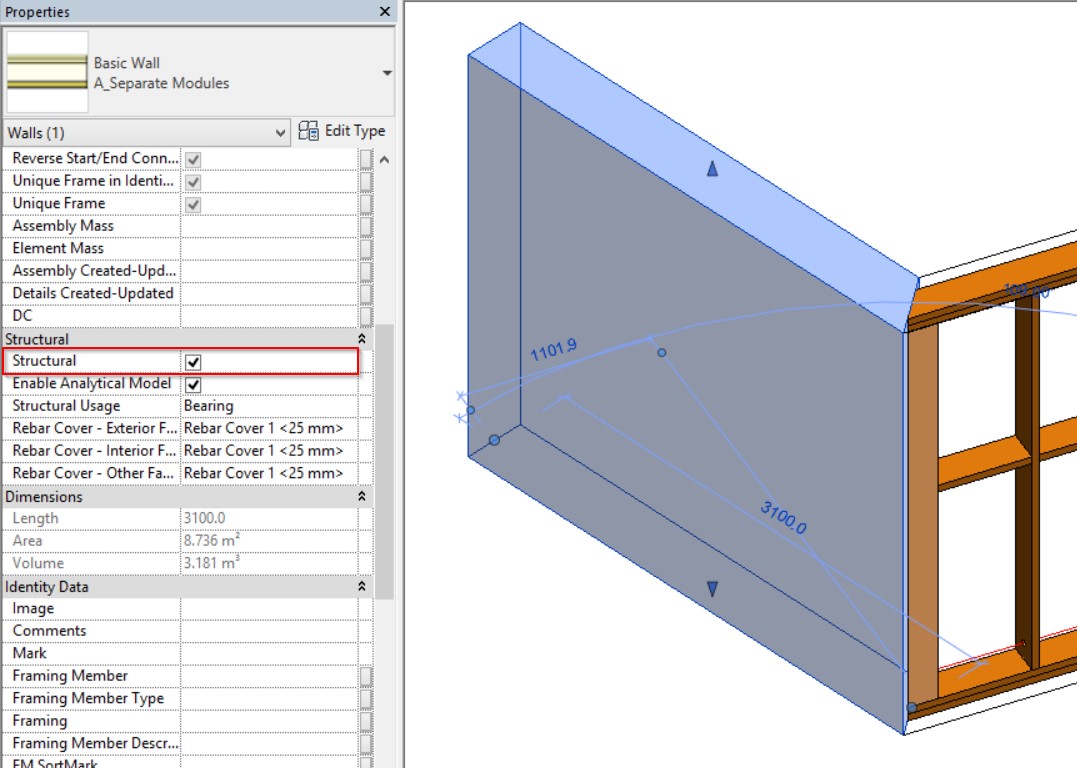
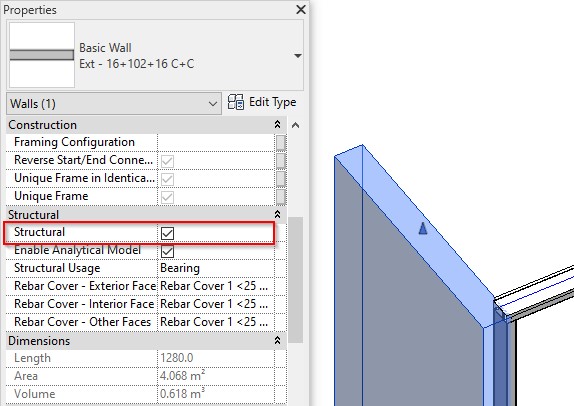
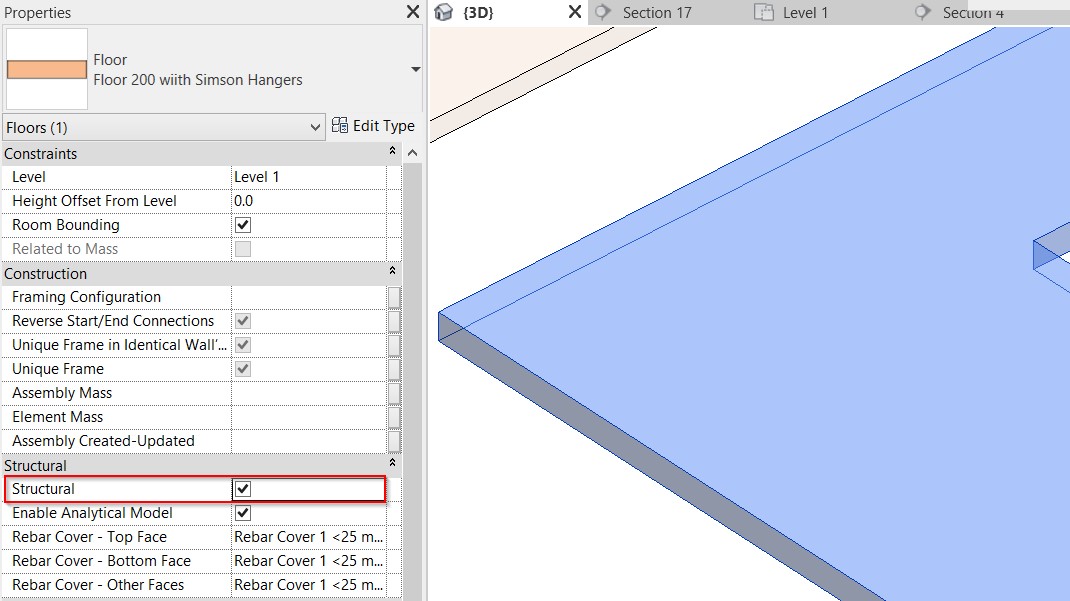
**Wall+** will pay attention into instance **Structural** wall parameter and will add blocking/nogging accordingly:

<figure><img src="https://239424168-files.gitbook.io/~/files/v0/b/gitbook-x-prod.appspot.com/o/spaces%2FqtUsszuAWXIZhQhrvjnb%2Fuploads%2FJYDdP7j2r7slOCxazxS9%2F2.jpeg?alt=media" alt=""><figcaption></figcaption></figure>

*Example with wall which will be used for metal frame:*

<figure><img src="https://239424168-files.gitbook.io/~/files/v0/b/gitbook-x-prod.appspot.com/o/spaces%2FqtUsszuAWXIZhQhrvjnb%2Fuploads%2Feby4ISKLRlwSgXSnXHOu%2F3.jpeg?alt=media" alt=""><figcaption></figcaption></figure>

*Example with floor which will be used for framing:*

<figure><img src="https://239424168-files.gitbook.io/~/files/v0/b/gitbook-x-prod.appspot.com/o/spaces%2FqtUsszuAWXIZhQhrvjnb%2Fuploads%2FpoRspSk0JkCLRLBTTyMK%2F4.jpeg?alt=media" alt=""><figcaption></figcaption></figure>

### Use Short Noggings

![](https://239424168-files.gitbook.io/~/files/v0/b/gitbook-x-prod.appspot.com/o/spaces%2FqtUsszuAWXIZhQhrvjnb%2Fuploads%2FPuHRsPjsJvqexH5rdk6J%2F5.jpeg?alt=media)

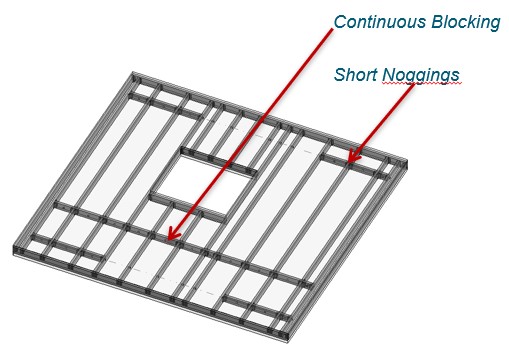
**Use Short Noggings** – select if noggings have to split between the studs.

![](https://239424168-files.gitbook.io/~/files/v0/b/gitbook-x-prod.appspot.com/o/spaces%2FqtUsszuAWXIZhQhrvjnb%2Fuploads%2FagQI8kkQHYoY0GBM2OfY%2F6.jpeg?alt=media)

*Example with metal wall frame:*

![](https://239424168-files.gitbook.io/~/files/v0/b/gitbook-x-prod.appspot.com/o/spaces%2FqtUsszuAWXIZhQhrvjnb%2Fuploads%2FJeqAONlHpiVXTFUeXjLG%2F7.jpeg?alt=media)

*Example with wood floor: **Use Short Noggings** is ON:*

![](https://239424168-files.gitbook.io/~/files/v0/b/gitbook-x-prod.appspot.com/o/spaces%2FqtUsszuAWXIZhQhrvjnb%2Fuploads%2F1BLTy4TYfVYU0rBLUqIM%2F8.jpeg?alt=media)

*Example: **Use Short Noggings** is OFF:*

![](https://239424168-files.gitbook.io/~/files/v0/b/gitbook-x-prod.appspot.com/o/spaces%2FqtUsszuAWXIZhQhrvjnb%2Fuploads%2FFLSuAEWweBPhPD3dBo7X%2F9.jpeg?alt=media)

*Example with metal floor:*

<figure><img src="https://239424168-files.gitbook.io/~/files/v0/b/gitbook-x-prod.appspot.com/o/spaces%2FqtUsszuAWXIZhQhrvjnb%2Fuploads%2FYbZPpYutVmU0OMRKnNdU%2F10.jpeg?alt=media" alt=""><figcaption></figcaption></figure>

### Diagonal Placement

![](https://239424168-files.gitbook.io/~/files/v0/b/gitbook-x-prod.appspot.com/o/spaces%2FqtUsszuAWXIZhQhrvjnb%2Fuploads%2FX188QJ7XBor4jZnFeNZ1%2F11.jpeg?alt=media)

**Diagonal Placement** – places blocking/nogging/briding parallel to top/bottom sloped plates or parallel on horizontal plates.&#x20;

*Example: Blocking is placed parallel to top sloped plate:*

![](https://239424168-files.gitbook.io/~/files/v0/b/gitbook-x-prod.appspot.com/o/spaces%2FqtUsszuAWXIZhQhrvjnb%2Fuploads%2Fo3KA7D9tQiyikXZHeUzz%2F12.jpeg?alt=media)

*Example: Blocking is placed parallel to top sloped rim joist:*

![](https://239424168-files.gitbook.io/~/files/v0/b/gitbook-x-prod.appspot.com/o/spaces%2FqtUsszuAWXIZhQhrvjnb%2Fuploads%2FuLMFavmyZqW5Z5ZX74PG%2F13.jpeg?alt=media)

### Align with Project Base Point

![](https://239424168-files.gitbook.io/~/files/v0/b/gitbook-x-prod.appspot.com/o/spaces%2FqtUsszuAWXIZhQhrvjnb%2Fuploads%2Fc3ZLWHHMSQqNSzhN5mQq%2F14.jpeg?alt=media)

**Align with Project Base Point –** allows positioning bridging elements not only in relation to each other but according to Revit gridlines.

First step – unclip the state of the Revit **Project Base Point** and move it to the needed position:

![](https://239424168-files.gitbook.io/~/files/v0/b/gitbook-x-prod.appspot.com/o/spaces%2FqtUsszuAWXIZhQhrvjnb%2Fuploads%2Fx7OwIKaxFY6M0uuR7PPU%2F15.jpeg?alt=media)

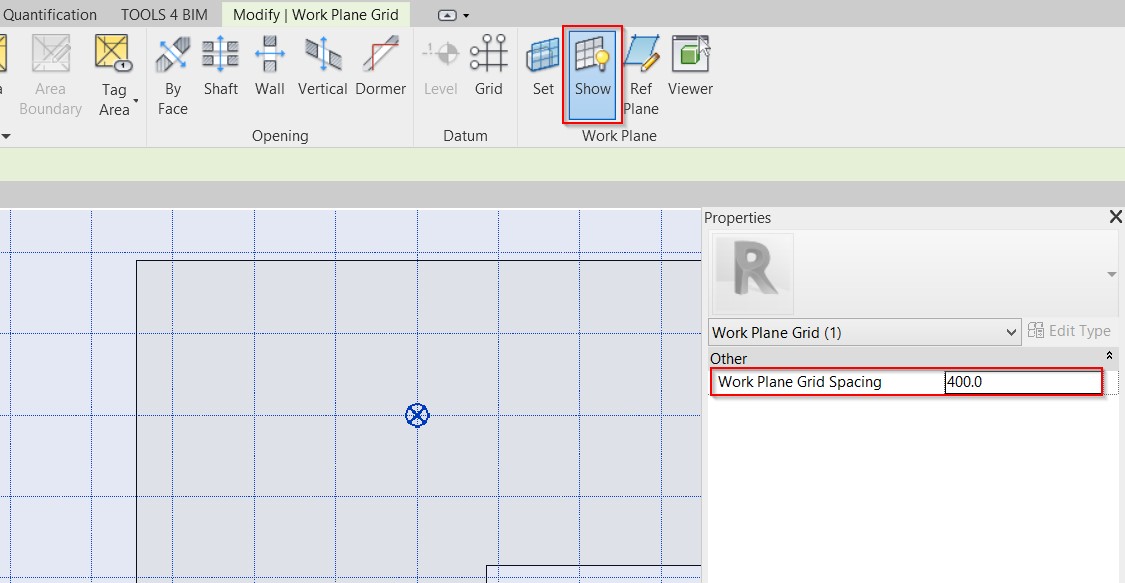
For more convenience, switch on Revit **Work Plane** and move it to the **Project Base Point**. It will help you to understand if the studs or joists are created in the right position:

<figure><img src="https://239424168-files.gitbook.io/~/files/v0/b/gitbook-x-prod.appspot.com/o/spaces%2FqtUsszuAWXIZhQhrvjnb%2Fuploads%2F1MzJuIWN6jZ3DmKD8ePP%2F16.jpeg?alt=media" alt=""><figcaption></figcaption></figure>

Turn on **Align with Project Base Point** in the **Framing Configuration** dialog:

![](https://239424168-files.gitbook.io/~/files/v0/b/gitbook-x-prod.appspot.com/o/spaces%2FqtUsszuAWXIZhQhrvjnb%2Fuploads%2FcNvS5eEjVCg6GLzNpofL%2F17.jpeg?alt=media)

Frame walls. First bridging/nogging/blocking will be aligned with the project base point:

![](https://239424168-files.gitbook.io/~/files/v0/b/gitbook-x-prod.appspot.com/o/spaces%2FqtUsszuAWXIZhQhrvjnb%2Fuploads%2FN95GPj61mAgfelobSkFw%2F18.jpeg?alt=media)

In case you need to relocate the frame, just move the **Project Base Point** to the new position and update the frame.

### **External/Internal is** *(in Roof+, Roof+M)*

![](https://239424168-files.gitbook.io/~/files/v0/b/gitbook-x-prod.appspot.com/o/spaces%2FqtUsszuAWXIZhQhrvjnb%2Fuploads%2FHMyrKJZFco9JdZugdaub%2F19.jpeg?alt=media)

**External/Internal is** – controls bridging position in the roof. Works when bridging **Position** (under **Custom Join**) = **External** or **Internal**.

*Example, **Vertical** option is selected:*

![](https://239424168-files.gitbook.io/~/files/v0/b/gitbook-x-prod.appspot.com/o/spaces%2FqtUsszuAWXIZhQhrvjnb%2Fuploads%2Fr6NEVBNvnPYIsMCBvU1z%2F20.jpeg?alt=media)

*Example, **Diagonal** option is selected:*

<figure><img src="https://239424168-files.gitbook.io/~/files/v0/b/gitbook-x-prod.appspot.com/o/spaces%2FqtUsszuAWXIZhQhrvjnb%2Fuploads%2FVQM5N8DaiUVCSm2Mhz9A%2Fb8fUPdquqZOPoXcIn9LL6cErBYPJ89ZmOA.png?alt=media&#x26;token=cc502b94-f202-4de7-bc65-4dcaa4efb3fc" alt=""><figcaption></figcaption></figure>

### Splits Secondary Studs/Joists

<figure><img src="https://239424168-files.gitbook.io/~/files/v0/b/gitbook-x-prod.appspot.com/o/spaces%2FqtUsszuAWXIZhQhrvjnb%2Fuploads%2FX4H6WM6Y8wzridmDJMol%2F-YQpc8TdJ8oEs6DiZBlPas5pvHUwbRqLaQ.png?alt=media&#x26;token=7afbedbe-a315-4f0f-bdfb-4aded5ec1628" alt=""><figcaption></figcaption></figure>

**Splits Secondary Studs/Joists** **–** if ticked current bridging/nogging/blocking will split secondary stud/joist.

*Example, every second blocking splits OSB which is created as secondary stud:*

<figure><img src="https://239424168-files.gitbook.io/~/files/v0/b/gitbook-x-prod.appspot.com/o/spaces%2FqtUsszuAWXIZhQhrvjnb%2Fuploads%2FvoAojmBPaEeoItu8MHwr%2F1GMeoeH6T1Budx2bgosI5V8p3wXfzYnzmQ.png?alt=media&#x26;token=75d36d3c-1a0f-4550-bf3f-ed3c43ec4d60" alt=""><figcaption></figcaption></figure>

*Example, in such case OSB is created as secondary stud and **Special BNB Splits this Stud/Joist** is selected:*

<figure><img src="https://239424168-files.gitbook.io/~/files/v0/b/gitbook-x-prod.appspot.com/o/spaces%2FqtUsszuAWXIZhQhrvjnb%2Fuploads%2FhqjmnASzu24MutPBf8Nv%2FMnmbwrQ8O8FuACXBHRhdEH63-ipVCeh12w.png?alt=media&#x26;token=6c621918-df0e-4f45-bd48-745686ef869e" alt=""><figcaption></figcaption></figure>

Blocking which splits has to have parameter **Split Part**.

<figure><img src="https://239424168-files.gitbook.io/~/files/v0/b/gitbook-x-prod.appspot.com/o/spaces%2FqtUsszuAWXIZhQhrvjnb%2Fuploads%2FfLE3pUeYvUkTOz3fzsMW%2FGwK_jOVRgt1wINllmdafYlMkF0KEigSenw.png?alt=media&#x26;token=338adab5-7759-4507-98ae-56456d64d0aa" alt=""><figcaption></figcaption></figure>

### Custom Join

<figure><img src="https://239424168-files.gitbook.io/~/files/v0/b/gitbook-x-prod.appspot.com/o/spaces%2FqtUsszuAWXIZhQhrvjnb%2Fuploads%2Fq8UOFJUVD4Mgd3cHjUsg%2Fc1Xl-qUYHThavoBUpSNtnbgc7W1J0zUOVg.png?alt=media&#x26;token=8c1b22a6-d6f2-428c-a634-5e58cc686966" alt=""><figcaption></figcaption></figure>

**Custom Join** – is a multi-functional dialog where user can define rules for joins/studs including size, count, position, rotation, spacing, alignment etc. All these rules can be saved and used in other framing configurations or shared with other users. This type of dialog is used frequently in our products, so [here you can read more about **Custom Join detailed description**](https://docs.besmart.software/3d-modeling-and-design/wood-framing/common/wood-metal-framing/custom-join)

### Rotate by Slope *(in Floor+, Floor+M, Roof+, Roof+M)*

<figure><img src="https://239424168-files.gitbook.io/~/files/v0/b/gitbook-x-prod.appspot.com/o/spaces%2FqtUsszuAWXIZhQhrvjnb%2Fuploads%2FolPL96WTurm7i3WvZ7AU%2FuwKFuDePAtpRlYbfTQgF4N9peO8-wMmTqw.png?alt=media&#x26;token=7db36eaf-44fd-4a49-800c-7681037dc94a" alt=""><figcaption></figcaption></figure>

**Rotate by Slope** – Joist/Rafter/Bridging can be rotated according to roof slope.

*Example: **Rotate by Slope** is ON:*

<figure><img src="https://239424168-files.gitbook.io/~/files/v0/b/gitbook-x-prod.appspot.com/o/spaces%2FqtUsszuAWXIZhQhrvjnb%2Fuploads%2FFmPyoH1HNAupWEzgruvE%2FhzrUfhpi0sWivQFLUnlJzFnAP6pAXJAsIg.png?alt=media&#x26;token=bf714001-593d-41b8-b727-b736afe59558" alt=""><figcaption></figcaption></figure>

*Example: **Rotate by Slope** is OFF:*

<figure><img src="https://239424168-files.gitbook.io/~/files/v0/b/gitbook-x-prod.appspot.com/o/spaces%2FqtUsszuAWXIZhQhrvjnb%2Fuploads%2FOt9sA293QCUReKIN4DrB%2FdkQ4KP2bg7dlH1i4EimDTAJhbu7tMWP3pQ.png?alt=media&#x26;token=c204cf2a-d994-4579-9c03-eb38a76648a6" alt=""><figcaption></figcaption></figure>

### Array1 or Array2

A set of rules for placing many blockings/noggings/bridgings.

<figure><img src="https://239424168-files.gitbook.io/~/files/v0/b/gitbook-x-prod.appspot.com/o/spaces%2FqtUsszuAWXIZhQhrvjnb%2Fuploads%2FIjAbmyACwkpIZydXj0ex%2FjXRLTdoa0_HEeWv00wdTwRq-BhLNYLWoNg.png?alt=media&#x26;token=013518d7-d7c6-4cd1-a6ee-eeec78727828" alt=""><figcaption></figcaption></figure>

**Array 1** or **Array 2 –** there are options to apply three array rules: **Array from Top**, **Bottom** or **Center** of the frame.

### Top/Bottom Plate Support (Auto)

<figure><img src="https://239424168-files.gitbook.io/~/files/v0/b/gitbook-x-prod.appspot.com/o/spaces%2FqtUsszuAWXIZhQhrvjnb%2Fuploads%2FTEGsTMU1GjcOeOZYZTVD%2FjxuZ9C3h4uL9R62Koi8jBwKX28vSCkmbZg.png?alt=media&#x26;token=2a190536-0113-4c06-9b51-9bfde18dd8da" alt=""><figcaption></figcaption></figure>

**Top/Bottom Plate Support (Auto)** – option to add top/bottom plate supports and align with top/bottom plate automatically. In such cases, the **Offset from Top** option is not available because it is calculated automatically.

<figure><img src="https://239424168-files.gitbook.io/~/files/v0/b/gitbook-x-prod.appspot.com/o/spaces%2FqtUsszuAWXIZhQhrvjnb%2Fuploads%2Fqxl5ejAbRkhZPRHj86ar%2FvWD-LaR2qVEZzzoaTClQy_3dV8Al4ffmjQ.png?alt=media&#x26;token=3c7e8a84-2588-4d2b-a038-3ac43b379dcb" alt=""><figcaption></figcaption></figure>

<figure><img src="https://239424168-files.gitbook.io/~/files/v0/b/gitbook-x-prod.appspot.com/o/spaces%2FqtUsszuAWXIZhQhrvjnb%2Fuploads%2F3aGkBUjZsxv6mdog9HM0%2FS6XRFyWmlcv_vSM98Wxc3BW9MHw1l3CppQ.png?alt=media&#x26;token=29de64da-3421-4499-a35c-eab03ddc3a6a" alt=""><figcaption></figcaption></figure>

*One more example:*

<figure><img src="https://239424168-files.gitbook.io/~/files/v0/b/gitbook-x-prod.appspot.com/o/spaces%2FqtUsszuAWXIZhQhrvjnb%2Fuploads%2FdXBdiaq824hbTOiJ8hw0%2FdxxX37h3TG3Yoyk24VBFUIUcRJXz_Aj6-w.png?alt=media&#x26;token=53da12ab-b1d5-4a84-a833-534d646441bf" alt=""><figcaption></figcaption></figure>

<figure><img src="https://239424168-files.gitbook.io/~/files/v0/b/gitbook-x-prod.appspot.com/o/spaces%2FqtUsszuAWXIZhQhrvjnb%2Fuploads%2FUD2O5AvdL0b2WLQKupok%2FHyKkEIzscpR-FTT6nnaWCy3xlyryxsxGYg.png?alt=media&#x26;token=1b521614-5af6-46d5-8805-323bbe0dc87a" alt=""><figcaption></figcaption></figure>

**Apply Offset** – different options for measuring offsets.

*Example, bridging offset is applied **by Slope** and measured from center to center:*

<figure><img src="https://239424168-files.gitbook.io/~/files/v0/b/gitbook-x-prod.appspot.com/o/spaces%2FqtUsszuAWXIZhQhrvjnb%2Fuploads%2FFKt4op8pdMSzDI5dNpqw%2FcUgKGRIkRZt3qikMmE66wglfEJk0Terngw.png?alt=media&#x26;token=2b886754-143b-449c-81ce-b2943268ad3e" alt=""><figcaption></figcaption></figure>

*Result:*

<figure><img src="https://239424168-files.gitbook.io/~/files/v0/b/gitbook-x-prod.appspot.com/o/spaces%2FqtUsszuAWXIZhQhrvjnb%2Fuploads%2FfS4ftv0qaKHELSnPbxfb%2FmPz8QK1BOozWq2mjQl3eIiIW4Uml7eWhxw.png?alt=media&#x26;token=4666e464-73cd-49b3-9a62-172532a129e5" alt=""><figcaption></figcaption></figure>

*Example, bridging offset is applied **Horizontally** and measured from center to center:*

<figure><img src="https://239424168-files.gitbook.io/~/files/v0/b/gitbook-x-prod.appspot.com/o/spaces%2FqtUsszuAWXIZhQhrvjnb%2Fuploads%2FKRnS4KJYeVgqGMqMKUU9%2F4fE9A7g4qP561q2tyyfmig94hHzplvBbVA.png?alt=media&#x26;token=2038c0ef-2104-4635-938d-79f670b4feef" alt=""><figcaption></figcaption></figure>

*Result:*

<figure><img src="https://239424168-files.gitbook.io/~/files/v0/b/gitbook-x-prod.appspot.com/o/spaces%2FqtUsszuAWXIZhQhrvjnb%2Fuploads%2FJItbjrceeqqa3YP39Fhe%2FX-Y0CuvXeiqZpn4U3c391qpJrSLKmprb8Q.png?alt=media&#x26;token=7329b034-04df-4973-9efb-502e3f359f5a" alt=""><figcaption></figcaption></figure>

**Additional Offset by Slope** – additional offset by slope for more accurate bridging placing.

<figure><img src="https://239424168-files.gitbook.io/~/files/v0/b/gitbook-x-prod.appspot.com/o/spaces%2FqtUsszuAWXIZhQhrvjnb%2Fuploads%2FMUlMjv0UEVIefzjRVXyH%2Fm5J8hlRUJ6o3yRWAArhAUPprS5Y_sEI6qw.png?alt=media&#x26;token=9add1e83-800a-4c03-a6c4-d1f6917a5258" alt=""><figcaption></figcaption></figure>

*Example, when **Offset from Base Face** = 1000 and **Additional Offset by Slope** = Add half Depth:*

<figure><img src="https://239424168-files.gitbook.io/~/files/v0/b/gitbook-x-prod.appspot.com/o/spaces%2FqtUsszuAWXIZhQhrvjnb%2Fuploads%2F6mFwBIYbnV7JMw1XgnW9%2FlBlTYrEqY9PoAlyc99U-gme6hD4Le9bwxA.png?alt=media&#x26;token=40360492-42fc-43bd-9a98-b84f8b3ffc53" alt=""><figcaption></figcaption></figure>

*Example, when **Offset from Base Face** = 1000, **Additional Offset by Slope** = Add half Depth and bridging is rotated 90º:*

<figure><img src="https://239424168-files.gitbook.io/~/files/v0/b/gitbook-x-prod.appspot.com/o/spaces%2FqtUsszuAWXIZhQhrvjnb%2Fuploads%2FKt5dMWD7DX0B7PCvGcIi%2F2ySyZFgYjSefeZm_z8MdiSpCIVf1JMqxTg.png?alt=media&#x26;token=739ae504-c63c-4f4e-85de-a9281ec0d11f" alt=""><figcaption></figcaption></figure>

**Offset from Top/Bottom** – nogging offset from top or bottom plate top face.

**Spacing** – spacing between rows of noggings.

**Number** – the number of bridging/nogging/blocking rows.

*Example 1:*

<figure><img src="https://239424168-files.gitbook.io/~/files/v0/b/gitbook-x-prod.appspot.com/o/spaces%2FqtUsszuAWXIZhQhrvjnb%2Fuploads%2Fe6f3JGnrbkfjRPmu2idj%2FELH-70Lg33ICKECO52H6FyswQWsAxPW4hQ.png?alt=media&#x26;token=2de675b3-f77d-4007-ad80-af1466da8ba5" alt=""><figcaption></figcaption></figure>

*Example 2:*

<figure><img src="https://239424168-files.gitbook.io/~/files/v0/b/gitbook-x-prod.appspot.com/o/spaces%2FqtUsszuAWXIZhQhrvjnb%2Fuploads%2FQbJE3ZivGgMSa5HBlg43%2Fw3SScYk3DjTaqmTi7yNUOXa176YvzTf2RQ.png?alt=media&#x26;token=094231a0-958e-4da7-9be6-2e089570c95c" alt=""><figcaption></figcaption></figure>

### Measure to

<figure><img src="https://239424168-files.gitbook.io/~/files/v0/b/gitbook-x-prod.appspot.com/o/spaces%2FqtUsszuAWXIZhQhrvjnb%2Fuploads%2FpagFgxJxzMgRk6ue3M6P%2FOvpQZKS8XYr2O3X9D7KEKVEyt6W3uM40pQ.png?alt=media&#x26;token=7376f142-c81d-450d-baeb-61f5f9320330" alt=""><figcaption></figcaption></figure>

**Measure to** – measures the offset and spacing to bridging/nogging/blocking top/bottom or center.

<figure><img src="https://239424168-files.gitbook.io/~/files/v0/b/gitbook-x-prod.appspot.com/o/spaces%2FqtUsszuAWXIZhQhrvjnb%2Fuploads%2Ff9Vdg2x1x88rrSVGCVmP%2Fz5f013S6M6YFVZpVuss2LWDxh53iJviCsw.png?alt=media&#x26;token=eb48c0b7-fd07-4442-90df-440b67d8fadd" alt=""><figcaption></figcaption></figure>

### Build in Place & Link to Connected

<figure><img src="https://239424168-files.gitbook.io/~/files/v0/b/gitbook-x-prod.appspot.com/o/spaces%2FqtUsszuAWXIZhQhrvjnb%2Fuploads%2Fy7B7azMlFHJaJ9jHiptI%2FUEo5ykcgMMu6rfwLPtP3yQEIEHa6chMwyQ.png?alt=media&#x26;token=f7bc05d8-5ba2-45d1-af03-93f22b809e35" alt=""><figcaption></figcaption></figure>

**Build in Place** – writes Yes/No information into the blocking/nogging/bridging instance parameter if it is build-in-place or is prefabricated with the whole wall frame. Later this parameter can be used in schedules or view filters.

**Link to Connected –** choose this option if end stud/joist is near wall corner and the element should be prefabricated and connected to an intersecting wall.

<figure><img src="https://239424168-files.gitbook.io/~/files/v0/b/gitbook-x-prod.appspot.com/o/spaces%2FqtUsszuAWXIZhQhrvjnb%2Fuploads%2FEUzjHob7rPs0a91lOdZq%2F0KzPpZO0fdq_d9H1r0quHOn8WRRj_Oh9hw.png?alt=media&#x26;token=8675842f-10c9-4287-b755-c0650f7c9ea7" alt=""><figcaption></figcaption></figure>

*Example with wood roof:*

<figure><img src="https://239424168-files.gitbook.io/~/files/v0/b/gitbook-x-prod.appspot.com/o/spaces%2FqtUsszuAWXIZhQhrvjnb%2Fuploads%2FeKt5A81eb1LINdN5XhDs%2FmqxFeaqMP2UXOhaT4SGnV4BFzcCwhZ-udQ.png?alt=media&#x26;token=439891ae-691d-4a3d-b3bb-b1a00a0da89a" alt=""><figcaption></figcaption></figure>

### Bays

<figure><img src="https://239424168-files.gitbook.io/~/files/v0/b/gitbook-x-prod.appspot.com/o/spaces%2FqtUsszuAWXIZhQhrvjnb%2Fuploads%2FEOocTZKx5ncrNc7CY3ov%2FzqaNk1_og6qoN_CfYQt60mSY2VHRvakaqw.png?alt=media&#x26;token=d8b12c88-19e2-4bfb-8cb6-91cfc1e95f0a" alt=""><figcaption></figcaption></figure>

**For First\&Last Bays** – select if bays should be applied for both sides of wall.

**Number of Bays** – number of bays from both wall sides.

<figure><img src="https://239424168-files.gitbook.io/~/files/v0/b/gitbook-x-prod.appspot.com/o/spaces%2FqtUsszuAWXIZhQhrvjnb%2Fuploads%2FWO8HyB6IlYIqRlMpdFlw%2FW4fotglDmdI6xKCk2oksunNwtx9RE2Jfrw.png?alt=media&#x26;token=0464b468-9bd0-41cb-b06c-48e8937f890a" alt=""><figcaption></figcaption></figure>

<figure><img src="https://239424168-files.gitbook.io/~/files/v0/b/gitbook-x-prod.appspot.com/o/spaces%2FqtUsszuAWXIZhQhrvjnb%2Fuploads%2Famo2XX7F8CHs0vlr1PIS%2F3nfFFXy1fzNB5JVEwtwBx6DBbypFwLtVKA.png?alt=media&#x26;token=e98a8c4e-2bd5-4a1b-b7fc-abe7611e868a" alt=""><figcaption></figcaption></figure>

### Use Alternating Offset

<figure><img src="https://239424168-files.gitbook.io/~/files/v0/b/gitbook-x-prod.appspot.com/o/spaces%2FqtUsszuAWXIZhQhrvjnb%2Fuploads%2F5q0mmbol8lYRq7GhGr4G%2FIFyxLC3wP0HagB20faKV2eNJdNUkvws34w.png?alt=media&#x26;token=c1e528b6-4f76-4186-9421-b3c7c633f06d" alt=""><figcaption></figcaption></figure>

**Use Alternating Offset** – use linear (no offset) or alternating offset of nogging rows.

<figure><img src="https://239424168-files.gitbook.io/~/files/v0/b/gitbook-x-prod.appspot.com/o/spaces%2FqtUsszuAWXIZhQhrvjnb%2Fuploads%2FhuzEonNZXt5HCj2PMyiv%2FkRzq0M6AP0Yg6wMIDmFy0-95haRqxxlvqw.png?alt=media&#x26;token=6d0c613f-184d-4b90-aa3e-dd11ab8c2722" alt=""><figcaption></figcaption></figure>

{% hint style="info" %}
**Note:** *this option is possible when **Use Short Noggings** is selected:*
{% endhint %}

<figure><img src="https://239424168-files.gitbook.io/~/files/v0/b/gitbook-x-prod.appspot.com/o/spaces%2FqtUsszuAWXIZhQhrvjnb%2Fuploads%2FlCzTxen8IZMh6r8G2mT0%2FQOpj1i8AnU7D9QWZ9Bw4yapSt7XRQryuAg.png?alt=media&#x26;token=795b729a-2a8b-4920-aa8a-e6963aaf66c5" alt=""><figcaption></figcaption></figure>

### Placement Limits

<figure><img src="https://239424168-files.gitbook.io/~/files/v0/b/gitbook-x-prod.appspot.com/o/spaces%2FqtUsszuAWXIZhQhrvjnb%2Fuploads%2FRs7eGVQZQJWgEEE8vbeR%2F4XOKYNNQ6yDY5bn2uo6io9vjxOxsQQePhA.png?alt=media&#x26;token=a7f17362-8fd2-4f4f-8e41-c564bf4c5136" alt=""><figcaption></figcaption></figure>

**Placement Limits** – Bridging/Nogging/Blocking placement. It can go: **Throughout** the frame, **Throughout except all Openings**, **Only through all Openings**, **Only through Windows**, **Only through Doors**, or **Only through Openings**.

*Example: Here are two top headers added automatically only above the openings:*

<figure><img src="https://239424168-files.gitbook.io/~/files/v0/b/gitbook-x-prod.appspot.com/o/spaces%2FqtUsszuAWXIZhQhrvjnb%2Fuploads%2FlywdUYazNqYnIfIK4XJ9%2FYaLdO3aLNuu3lnifexHC_P0PMC-qGHNWJA.png?alt=media&#x26;token=d8d5d1f0-e7a5-492c-8460-5b6d05daea80" alt=""><figcaption></figcaption></figure>

*Example in front view:*

<figure><img src="https://239424168-files.gitbook.io/~/files/v0/b/gitbook-x-prod.appspot.com/o/spaces%2FqtUsszuAWXIZhQhrvjnb%2Fuploads%2FFvpvNIvVgbEAaKgTottw%2Fxnse43HSantAbBUikjHnymhCt8ZOilKV4Q.png?alt=media&#x26;token=29484795-7972-4b6b-a62a-c4c841ca3095" alt=""><figcaption></figcaption></figure>

*Example with metal wall:*

*Here are two top headers added automatically only above the openings:*

<figure><img src="https://239424168-files.gitbook.io/~/files/v0/b/gitbook-x-prod.appspot.com/o/spaces%2FqtUsszuAWXIZhQhrvjnb%2Fuploads%2FGonFxgCvWHMT5NqoXDca%2Fszgegr-ZOUr83hzRnoAmpx5KX895F4qFNA.png?alt=media&#x26;token=15a931f1-5bb2-4fc6-9631-1f4d49c22479" alt=""><figcaption></figcaption></figure>

**When Opening Width is over** and **When Opening Width is less than** – here you can predefine the opening sizes for placing Bridging/Nogging/Blocking. For example, big openings can have additional bridging above or below.

### Cross Diagonal Cripple Studs/Joist

<figure><img src="https://239424168-files.gitbook.io/~/files/v0/b/gitbook-x-prod.appspot.com/o/spaces%2FqtUsszuAWXIZhQhrvjnb%2Fuploads%2F30fNNwgM7v2R2fVLFa0w%2FgmMVY-iawj0uE5HAadVrPaBw7IwNqhKX5w.png?alt=media&#x26;token=9aed598e-4af8-4892-90ec-74a43bb01e36" alt=""><figcaption></figcaption></figure>

**Cross Diagonal Cripple Studs/Joists** – select if Bridging/Nogging/Blocking should go through diagonal cripple studs.

<figure><img src="https://239424168-files.gitbook.io/~/files/v0/b/gitbook-x-prod.appspot.com/o/spaces%2FqtUsszuAWXIZhQhrvjnb%2Fuploads%2FZDLUj0GtQECWjvjXATig%2FQvo-Pn1mtXrC6Dx9TQ9r7etfwfIp72oo8A.png?alt=media&#x26;token=c93083fb-e3d6-422e-97df-047f9f4c7369" alt=""><figcaption></figcaption></figure>

### Cross Sloped Top/Bottom Plates

<figure><img src="https://239424168-files.gitbook.io/~/files/v0/b/gitbook-x-prod.appspot.com/o/spaces%2FqtUsszuAWXIZhQhrvjnb%2Fuploads%2FeYNnnm499wXKIKRIWaPj%2FsKcrKGMkaT-mWgwl3Ug8s7Oj-9O4rjStlw.png?alt=media&#x26;token=f8fe064b-85a4-419a-aa23-97d78b2ed515" alt=""><figcaption></figcaption></figure>

**Cross Sloped Top/Bottom Plates** – select if Bridging/Nogging/Blocking should go through places with sloped plates.

<figure><img src="https://239424168-files.gitbook.io/~/files/v0/b/gitbook-x-prod.appspot.com/o/spaces%2FqtUsszuAWXIZhQhrvjnb%2Fuploads%2FDaaqsD1463oYvBnHFFhX%2FtNgxS0YsOfbZAiN5r_tLWN_KEGW0hYo9Fg.png?alt=media&#x26;token=e8a2812a-294b-4435-93b5-b1c972e440b0" alt=""><figcaption></figcaption></figure>